

In this guide, you will learn how you can easily integrate ScraperAPI with Splash to handle JavaScript-heavy websites that require browser rendering. I will walk you through the recommended integration methods and show you how to leverage both Splash’s rendering capabilities and ScraperAPI’s proxy infrastructure.
Recommended Method: Route Splash through ScraperAPI Proxy
To get full rendering with ScraperAPI’s rotating proxies, simply run Splash with ScraperAPI’s proxy configured.
Requirements
- Python
- Splash (via Docker)
requests(Python HTTP library)- Docker (for running Splash)
- ScraperAPI & API key (store this in a
.envfile)
1. Install and run Splash
Install your requirements (requests is the only one you need to install explicitly via pip). If you don’t have Docker installed, download and install it here. After installing, make sure it’s running before continuing.
Start Splash via Docker:
pip install requests
docker run -p 8050:8050 scrapinghub/splash
If you receive an error stating that port 8050 is already in use, it means another Splash container is already running.
To fix this:
- Find the container using port 8050
Run this in your terminal:
docker ps
- You’ll see something like:
CONTAINER ID   IMAGE                PORTS
abc123         scrapinghub/splash   0.0.0.0:8050->8050/tcp
- Stop the container with the container ID from the previous step:
docker stop abc123
Replace abc123 with your actual container ID and run your Splash container again.
2. Splash Request Example (Basic Integration)
If you haven’t already, create an account on ScraperAPI and get your API key.
Create a .env file to securely store your ScraperAPI key:
SCRAPERAPI_KEY=your_scraperapi_key_here
In your root folder, create a Python file and paste the following:
import os
import requests
from dotenv import load_dotenv
import time

# Load the ScraperAPI key from .env file
load_dotenv()
API_KEY = os.getenv("SCRAPERAPI_KEY")
SPLASH_EXECUTE_URL = "http://localhost:8050/execute"

# Optimized Lua script for ScraperAPI proxy
LUA_SCRIPT = """
function main(splash)
   splash.private_mode_enabled = false
   splash:on_request(function(request)
       request:set_header('User-Agent', 'Mozilla/5.0 (Windows NT 10.0; Win64; x64) AppleWebKit/537.36')
       -- Set longer timeout for proxy connections
       request:set_timeout(45)
   end)

   -- Set page load timeout
   splash:set_viewport_size(1920, 1080)
   splash:set_viewport_full()

   local ok, reason = splash:go{
       splash.args.url,
       baseurl=splash.args.url,
       http_method="GET",
       headers={
           ["Accept"] = "text/html,application/xhtml+xml,application/xml;q=0.9,*/*;q=0.8",
           ["Accept-Language"] = "en-US,en;q=0.5",
           ["Accept-Encoding"] = "gzip, deflate",
           ["DNT"] = "1",
           ["Connection"] = "keep-alive",
           ["Upgrade-Insecure-Requests"] = "1",
       }
   }

   if not ok then
       if reason:find("timeout") then
           return {error = "Page load timeout", reason = reason}
       else
           return {error = "Page load failed", reason = reason}
       end
   end

   -- Wait for JavaScript to load
   splash:wait(3)

   -- Check if page loaded successfully
   local title = splash:evaljs("document.title")
   if not title or title == "" then
       splash:wait(2)  -- Wait a bit more
   end

   return {
       html = splash:html(),
       title = splash:evaljs("document.title"),
       url = splash:url(),
       status = "success"
   }
end
"""

def scrape_with_splash_scraperapi(url, retries=3):
   proxy = f"http://scraperapi:{API_KEY}@proxy-server.scraperapi.com:8001"
   print(f"🔍 Fetching with Splash + ScraperAPI: {url}")

   for attempt in range(retries):
       print(f"🔄 Attempt {attempt + 1}/{retries}")

       try:
           response = requests.post(SPLASH_EXECUTE_URL, json={
               "lua_source": LUA_SCRIPT,
               "url": url,
               "proxy": proxy,
               "timeout": 180,  # 3 minutes for Splash
               "resource_timeout": 60,  # 1 minute per resource
               "wait": 0.5,
               "html": 1,
               "har": 0,  # Disable HAR to reduce overhead
               "png": 0,  # Disable PNG to reduce overhead
           }, timeout=200)  # 200 seconds for the entire request

           if response.status_code == 200:
               try:
                   result = response.json()
                   if isinstance(result, dict) and "html" in result:
                       html_content = result["html"]
                       if len(html_content) > 1000:
                           with open("output.html", "w", encoding="utf-8") as f:
                               f.write(html_content)
                           print(f"✅ Success! HTML saved to output.html")
                           print(f"📄 Page title: {result.get('title', 'N/A')}")
                           print(f"🔗 Final URL: {result.get('url', 'N/A')}")
                           return True
                       else:
                           print(f"⚠️ HTML content too short ({len(html_content)} chars)")
                   else:
                       # Fallback for plain HTML response
                       if len(response.text) > 1000:
                           with open("output.html", "w", encoding="utf-8") as f:
                               f.write(response.text)
                           print("✅ HTML saved to output.html (fallback)")
                           return True
               except:
                   # If JSON parsing fails, treat as plain HTML
                   if len(response.text) > 1000:
                       with open("output.html", "w", encoding="utf-8") as f:
                           f.write(response.text)
                       print("✅ HTML saved to output.html (plain text)")
                       return True
           else:
               print(f"❌ HTTP {response.status_code}")
               error_text = response.text[:500]
               print(f"Error: {error_text}")

               # Check for specific timeout errors
               if "timeout" in error_text.lower() or "504" in error_text:
                   print("⏰ Timeout detected, retrying with longer timeout...")
                   time.sleep(5)  # Wait before retry
                   continue

       except requests.exceptions.Timeout:
           print(f"⏰ Request timeout on attempt {attempt + 1}")
           if attempt < retries - 1:
               print("🔄 Retrying in 10 seconds...")
               time.sleep(10)
       except requests.exceptions.RequestException as e:
           print(f"🚨 Request failed: {e}")
           if attempt < retries - 1:
               print("🔄 Retrying in 5 seconds...")
               time.sleep(5)

   print("❌ All attempts failed")
   return False

def test_splash_connection():
   try:
       res = requests.get("http://localhost:8050", timeout=5)
       return res.status_code == 200
   except:
       return False

def test_scraperapi_key():
   if not API_KEY:
       print("❌ SCRAPERAPI_KEY not found in .env file")
       return False
   print(f"✅ ScraperAPI key loaded: {API_KEY[:8]}...")
   return True

if __name__ == "__main__":
   print("🚀 Starting Splash + ScraperAPI test...")

   if not test_scraperapi_key():
       exit(1)

   if not test_splash_connection():
       print("❌ Splash is not running. Start with:")
       print("docker run -p 8050:8050 scrapinghub/splash --max-timeout 300 --slots 5 --maxrss 4000")
       exit(1)

   print("✅ Splash is running")

   # Test with a simpler site first
   test_url = "http://quotes.toscrape.com/js"
   success = scrape_with_splash_scraperapi(test_url)

   if success:
       print("🎉 Test completed successfully!")
   else:
       print("💥 Test failed. Try restarting Splash with higher limits:")
       print("docker run -p 8050:8050 scrapinghub/splash --max-timeout 300 --slots 5 --maxrss 4000")
This script sends a request to Splash. It goes through ScraperAPI’s rotating proxy. This helps bypass blocks and load content that uses a lot of JavaScript. It then saves the HTML locally for inspection and confirms if the integration works successfully.
While Docker is running, run your Python script:
python your_script.py
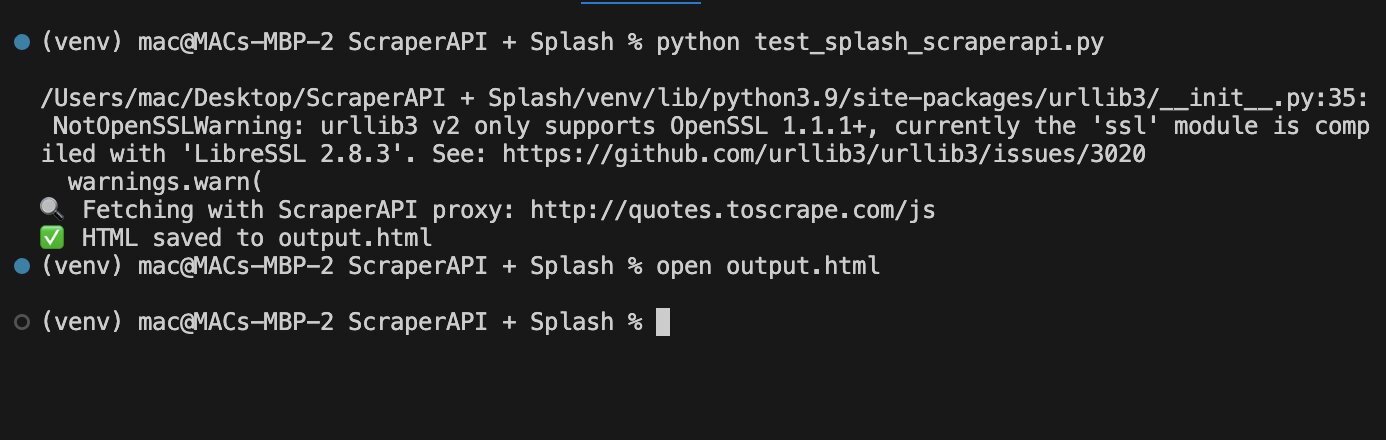
Then open the output:
open output.html
Final Output Preview
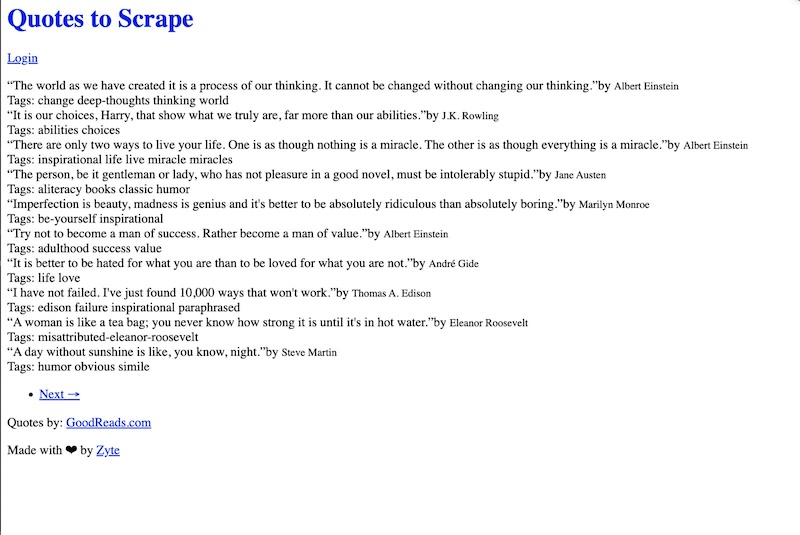
Alternative Method: Proxy Inside Lua Script (Not Recommended)
Some devs may try injecting the proxy directly into the Lua script:
splash:set_proxy('scraperapi:YOUR_API_KEY@proxy-server.scraperapi.com:8001')
This method often fails with errors like:
attempt to call method 'set_proxy' (a nil value)
Why it fails:
- Some Splash builds don’t support
set_proxy - Proxy commands in Lua are not as stable
- Debugging Lua stack traces is harder than using standard Python errors
Common Challenges
Here are some issues you might run into:
| Problem | Cause | Solution |
|---|---|---|
port is already allocated |
Docker port conflict on 8050 | Kill the process using lsof -i :8050 and kill -9 <PID> |
set_proxy Lua errors |
Your Splash build doesn’t support set_proxy |
Use the "proxy" field in the JSON request instead of scripting it in Lua |
504 timeout |
Splash didn’t finish rendering within the timeout | Increase timeout with --max-timeout 300 when running the Docker container |
400 malformed request |
Missing or incorrect ScraperAPI key | Store key in .env and load it with dotenv in your script |
urllib3 LibreSSL warning |
macOS ships with LibreSSL instead of OpenSSL | Use pyenv to install Python with OpenSSL 1.1+ for better compatibility |
Using ScraperAPI Features
Premium Proxies & Geotargeting
Use special headers to customize ScraperAPI behavior:
Example:
headers = {
   'X-ScraperAPI-Premium': 'true',
   'X-ScraperAPI-Country': 'us',
   'X-ScraperAPI-Session': '123'
}

response = requests.get(SPLASH_URL, params={
   'url': target_url,
   'wait': 1,
}, headers=headers, proxies={
   'http': f'http://scraperapi:{API_KEY}@proxy-server.scraperapi.com:8001',
   'https': f'http://scraperapi:{API_KEY}@proxy-server.scraperapi.com:8001',
})
Handling Retries
Add retry logic for failed requests:
import time

def fetch_with_retry(url, max_retries=3):
   for attempt in range(max_retries):
       try:
           res = requests.get(SPLASH_URL, params={
               'url': url,
               'wait': 1,
           }, proxies={
               'http': f'http://scraperapi:{API_KEY}@proxy-server.scraperapi.com:8001',
               'https': f'http://scraperapi:{API_KEY}@proxy-server.scraperapi.com:8001',
           }, timeout=60)

           if res.status_code == 200:
               return res.text
       except Exception as e:
           print(f"Attempt {attempt+1} failed: {e}")
           time.sleep(2)
   return None

html = fetch_with_retry('http://quotes.toscrape.com/js')
print(html)
Concurrent Scraping
Scale up with multiple threads:
from concurrent.futures import ThreadPoolExecutor

API_KEY = 'YOUR_API_KEY'
SPLASH_URL = 'http://localhost:8050/render.html'

def scrape_page(url):
   response = requests.get(SPLASH_URL, params={
       'url': url,
       'wait': 1,
   }, proxies={
       'http': f'http://scraperapi:{API_KEY}@proxy-server.scraperapi.com:8001',
       'https': f'http://scraperapi:{API_KEY}@proxy-server.scraperapi.com:8001',
   }, timeout=60)

   return response.text if response.status_code == 200 else None

urls = [
   'http://quotes.toscrape.com/js/page/1/',
   'http://quotes.toscrape.com/js/page/2/',
   'http://quotes.toscrape.com/js/page/3/',
]

# Use max_workers equal to your ScraperAPI concurrent limit
with ThreadPoolExecutor(max_workers=5) as executor:
   results = list(executor.map(scrape_page, urls))

for i, html in enumerate(results):
   if html:
       print(f"Page {i+1}: {len(html)} characters")
Configuration Tips
Timeout Settings
Set appropriate timeouts for ScraperAPI processing:
response = requests.get(SPLASH_URL, params={
   'url': target_url,
   'wait': 2,
   'timeout': 90,  # Allow time for ScraperAPI retries
}, proxies={
   'http': f'http://scraperapi:{API_KEY}@proxy-server.scraperapi.com:8001',
   'https': f'http://scraperapi:{API_KEY}@proxy-server.scraperapi.com:8001',
}, timeout=120)
Resource Filtering
Optimize performance by disabling unnecessary resources:
response = requests.get(SPLASH_URL, params={
   'url': target_url,
   'wait': 1,
   'images': 0,      # Disable images
   'filters': 'easylist',  # Block ads
}, proxies={
   'http': f'http://scraperapi:{API_KEY}@proxy-server.scraperapi.com:8001',
   'https': f'http://scraperapi:{API_KEY}@proxy-server.scraperapi.com:8001',
})
Final Notes
- Proxy routing through ScraperAPI is the preferred method; it keeps Splash stable and functional.
- Avoid proxy logic in Lua scripts to reduce the risk of errors.
- Set timeouts generously; both Splash and ScraperAPI benefit from >90s.
- Store API keys in
.env, never hardcode.
More Resources: