
Webinar: Buy reliability, build intelligence
Search APIs return snippets; extractors return pages your LLM must parse. The ScraperAPI LlamaIndex integration gives your agents structured JSON from Amazon, Google, eBay, Walmart, and Redfin, plus raw scraping of any URL in one pip install.
No credit card required. 5,000 free API credits.
Up to 99.99% success rate
40M+ proxies
1 pip install
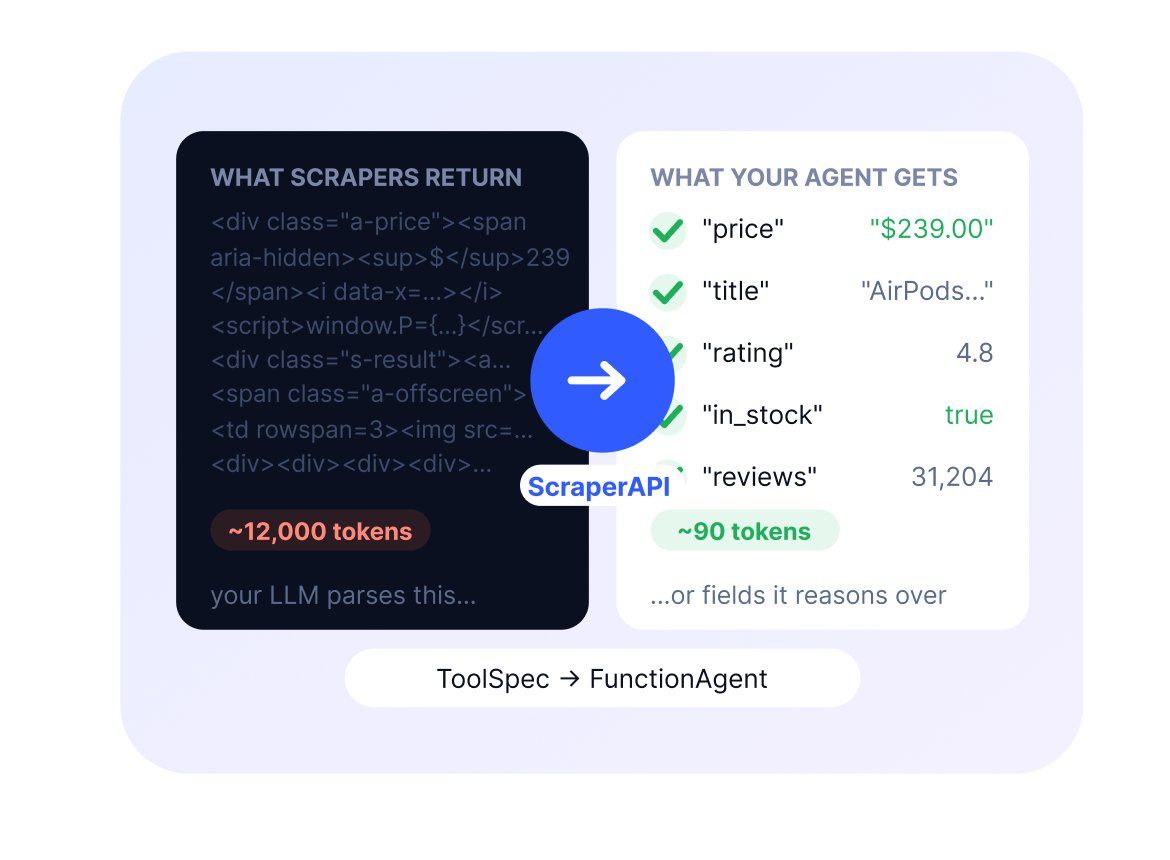
Once your agent’s web tool returns fields instead of block pages, these are the kinds of LlamaIndex agents builders ship.

Web research agent
A FunctionAgent that reads live pages and Google results mid-run and reasons over structured fields instead of raw HTML a web research pipeline in a single ToolSpec.

RAG pipeline on live web data
Scrape websites straight into your LlamaIndex RAG pipeline: load clean output into vector storage so retrieval runs on current data instead of a stale crawl.

E-commerce price and product agent
Structured Amazon, Walmart, and eBay JSON: price, title, availability, so your agent stops hallucinating prices from parsed HTML. An e-commerce pipeline without a single parser.

SERP and real-estate monitors
Pull Google Search results and Redfin listings as structured fields on a schedule, so your agent tracks rankings, prices, and listings without parsing pages.
Your agent needs to reach any URL, get data it can reason over, and stay native to LlamaIndex. The ScraperAPI ToolSpec delivers all three through LlamaIndex tool-calling.
pip install llama-index-tools-scraperapi, then ToolSpec → FunctionAgent in about a dozen lines
From pip install to a web-scraping FunctionAgent in under five minutes.
# pip install llama-index-tools-scraperapi
from llama_index.tools.scraperapi import ScraperAPIToolSpec
from llama_index.core.agent.workflow import FunctionAgent
from llama_index.llms.openai import OpenAI

scraper_tool = ScraperAPIToolSpec(api_key="YOUR_API_KEY")

agent = FunctionAgent(
    tools=scraper_tool.to_tool_list(),
    llm=OpenAI(model="gpt-4.1"),
)Your agent stops failing mid-run
When a page-fetch tool returns a block page or an empty shell, the run is wasted. ScraperAPI’s tools open protected, JS-heavy pages so your FunctionAgent keeps working.

Up to 99.99% success rate, even on protected sites
High success rates keep your LlamaIndex agents running on sites like Amazon and Google. When a site updates its anti-bot protection, ScraperAPI adapts automatically.

Structured data your agent can reason over
Tools return the fields your agent needs: price, title, listing, result so it gets the data, not the page, and spends fewer tokens reasoning over it.

One pip install, nothing to host
Run pip install llama-index-tools-scraperapi, pass the ToolSpec to your agent, and it has web access. No MCP server to run, no proxies to configure, no scraping infrastructure to maintain.

Pay only for data that comes back clean
No charges for failed requests. ScraperAPI handles IP rotation, JavaScript rendering, and CAPTCHA bypass behind the scenes, so you only pay for successful results.
Works with any LLM and the rest of your stack
FunctionAgent tools are LLM-agnostic OpenAI, Anthropic, or local models, and the same web access also runs under LangChain, MCP, the CLI, and n8n.
ScraperAPI plugs into the rest of your stack, too. The same reliable web access runs under the CLI, MCP Server, and LangChain integration one account and one set of credits.

CLI
For the terminal
Reach any page from your terminal in one command: raw HTML, text, markdown, or parsed JSON. See the exact credit cost before you run it. Feed the clean output straight to an LLM, RAG pipeline, or training set.

LangChain
For Python developers
Add web access to your LangChain agents in two lines. They reach any public URL and get clean text, markdown, or structured JSON from Amazon, Google, eBay, Walmart, and Redfin. Your agent gets the data, not page.

MCP server
For MCP clients
Give any MCP client access to live web data. Pull Amazon and Walmart prices, SERP results, or read any public URL. Your agent gets the data, not the page.
Run pip install llama-index-tools-scraperapi, create a ScraperAPIToolSpec with your API key, and pass to_tool_list() to a FunctionAgent. Your agent can then scrape any URL and pull structured data from Amazon, Google, eBay, Walmart, and Redfin, with proxies, rendering, and retries handled for you.
It’s the native LlamaIndex pattern: ToolSpec → FunctionAgent in about a dozen lines. Instantiate the ScraperAPI ToolSpec, hand the LlamaIndex tools it exposes scrape, google, amazon, ebay, walmart, redfin to a FunctionAgent along with your LLM, and the agent decides which to call mid-run.
Give it fields instead of pages. The Amazon, Walmart, and eBay tools return structured JSON: price, title, availability, so the model reads a value rather than guessing one from parsed markup. Schemas are maintained server-side, so a site redesign doesn’t quietly corrupt your data.
Yes. Use the scrape tool to pull live pages, then load the output into your index or vector storage so retrieval runs on current data. It’s a common pattern for building a LlamaIndex RAG pipeline on the open web. ScraperAPI acts as a live-web data connector alongside your other LlamaIndex readers.
Search APIs like Tavily and SerpAPI return search snippets and links useful for retrieval, but your agent still has to fetch and parse the pages behind them. ScraperAPI returns the fields themselves as structured JSON from Amazon, Google, eBay, Walmart, and Redfin, plus raw scraping of any URL with 40M+ proxies, CAPTCHA handling, and JS rendering behind it.
Markdown extractors return a cleaner page, but it’s still a page your LLM must parse, and long pages in context drive up token cost. ScraperAPI returns the fields your agent reasons over; when you do want the full page, the scrape tool returns it untouched.
Whichever framework you prefer, ScraperAPI is native in both. LlamaIndex gets a ToolSpec for FunctionAgents; LangChain gets a tool for its agent executor. Same web access, same account, same credits either way.
Start with 5,000 free API credits to test your agent no credit card required. After that, upgrade to a transparent credit-based plan, and you only pay for successful requests.


Add the ScraperAPI ToolSpec to your LlamaIndex project and pull clean, structured web data into your agents in minutes.
No credit card required. 5,000 free API credits to start.