ScraperAPI has acquired Traject Data

Live web data for AI agents and automated workflows

Get live web data for price tracking, SERP monitoring, market research, and lead intelligence — in the tools your team already uses.

No card required. Connect your first workflow in minutes.

99.9% success rate

40M+ IPs

150+ countries

What teams build with ScraperAPI

Automations that run on live web data.

Competitor pricing monitor

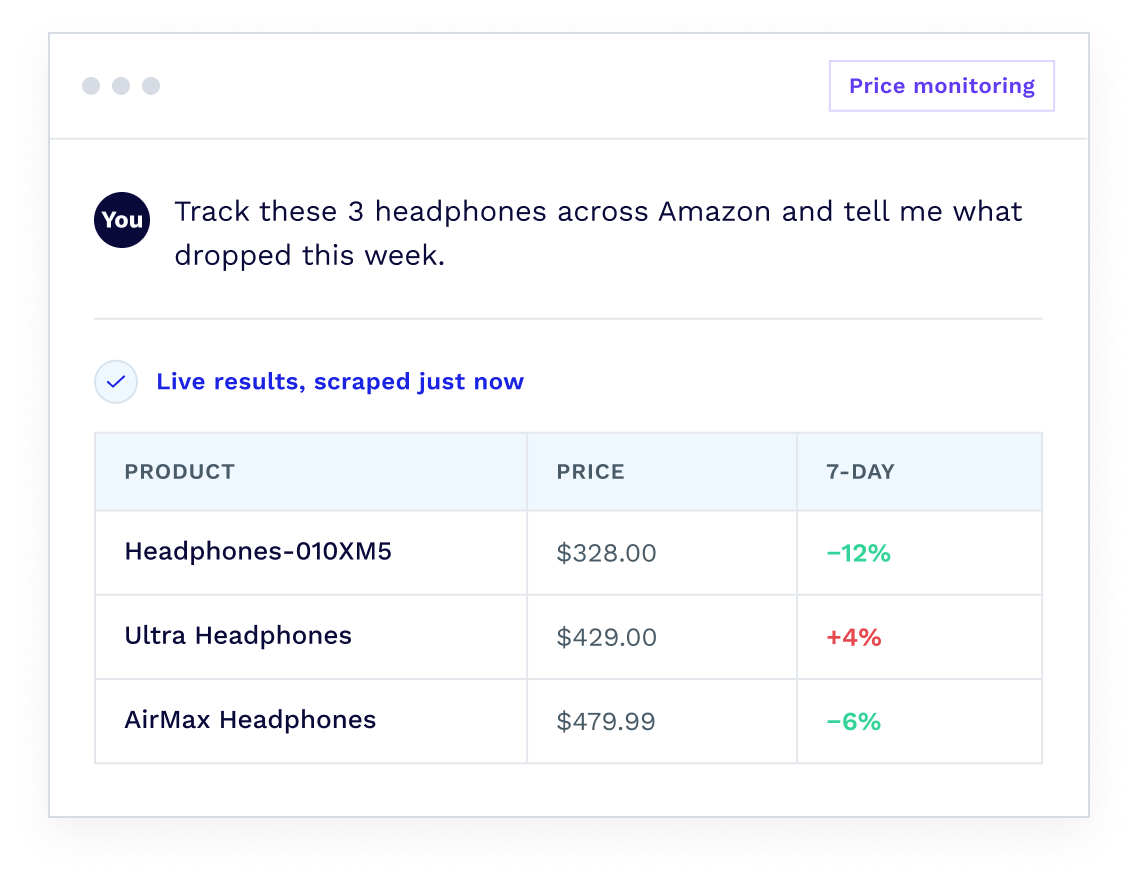
Track prices across Amazon, Walmart, and competitor sites automatically. Your workflow pulls live data on a schedule and flags changes.

Market research

Pull competitor pages, news sources, and industry sites automatically. Your AI works with structured, current data — no manual searches, no stale exports.

Lead research automation

Pull company data, job listings, and contact signals from public directories and websites. Your workflow enriches the list; you focus on the outreach.

SERP and ranking tracker

Monitor keyword positions, track SERP features, and pull structured search results automatically. Schedule it and get clean results, weekly, daily, or hourly.

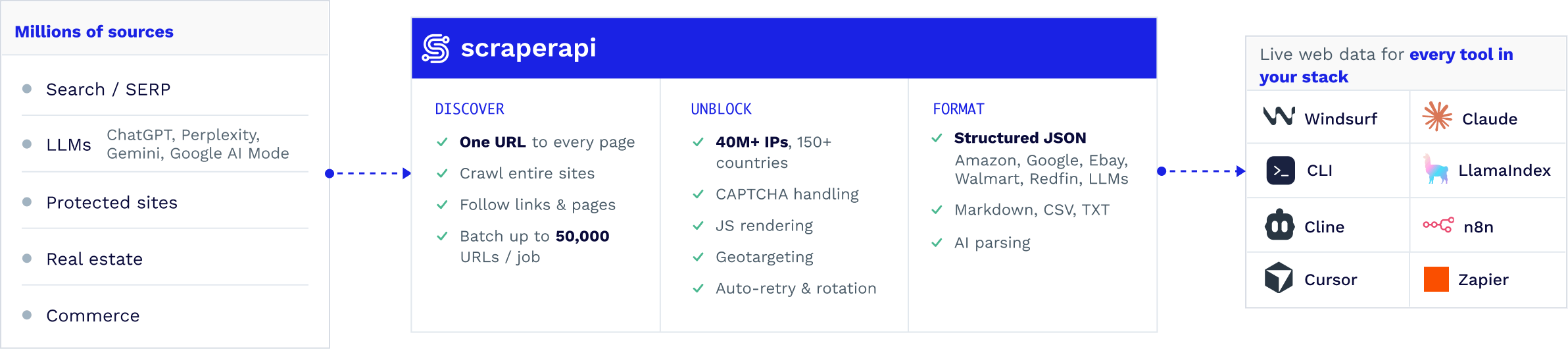
Native integrations for your automation stack

Connect the tools you already use to the live web.

Claude plugin

For Claude Code and Cowork

Ask Claude for live web data and get structured results back in the conversation. No setup, no configuration — just tell Claude what you need and ScraperAPI handles the rest.

n8n node

For workflow builders

Add ScraperAPI as a native node in your n8n workflows. Pull live data — prices, search results, news, listings — on a schedule or as a trigger. No code required.

CLI & MCP Server

For terminal and MCP clients

Run ScraperAPI straight from your terminal with the CLI. Or connect once via MCP and it works across every MCP client you use today, and any new one you adopt. Either way, routing is handled automatically, so the right endpoint is picked without you writing the logic.

LangChain & LlamaIndex

For Python developers

Give your agents reliable access to the live web. Raw HTML, clean markdown, or structured JSON from Google, Amazon, and any other site — with bot detection and retries built in.

Everything Your AI Agents Need

Three powerful capabilities, one simple integration

Scraper API Tool

Google & Amazon Structured Tools

LLM Optimized Output by Design

See It in Action

From basic chatbot to intelligent web agent in just under 5 min.

python snippet
from langchain_openai import ChatOpenAI
from langchain.agents import AgentExecutor, create_openai_tools_agent
from langchain_scraperapi import ScraperAPITool
from langchain.prompts import PromptTemplate


input = "Find Python developer jobs in London"
prompt = PromptTemplate(
	template="""
	You are a job search AI assistant with the ability to browse Google jobs via an API. 
	Help the user based on their request: {input} / {agent_scratchpad}.
	""",
	input_variables=["input", "agent_scratchpad"]
)


model = ChatOpenAI( )
tools = [
	ScraperAPITool(
		type="structured",
		endpoint="google/jobs",
		tld="co.uk", # search for jobs in the UK only, as an example
		max_results=10
	)
]

agent = create_openai_tools_agent (model, tools, prompt)
agent_executor = AgentExecutor(
 	agent=agent, 
 	tools=tools,
)

result = agent_executor . invoke({"input": input})
Without ScraperAPI x LangChain
With ScraperAPI x LangChain

Why 10,000+ Teams Choose ScraperAPI

Replace hours of manual data work

Stop refreshing spreadsheets, copy-pasting from websites, and waiting on engineering to pull a dataset. ScraperAPI pulls it for you, automatically, every time your workflow runs.

Your workflows keep running — even on protected sites

99.9% success rate on sites like Amazon, Google. When a site updates its anti-bot protection, ScraperAPI adapts — your automation doesn’t break.

Data your AI can actually use

ScraperAPI returns clean markdown and structured JSON — not raw HTML. Your AI reads it correctly the first time, with no extra cleanup step between the data and the
decision.

Connect in minutes, with or without code

Install the ScraperAPI Claude plugin, run it from your terminal with the ScraperAPI CLI, or add it to your LangChain project. No proxies to configure, no infrastructure to maintain.

Pay only for data that comes back clean

No charges for failed requests. ScraperAPI handles IP rotation, JavaScript rendering, and CAPTCHA bypassing behind the scenes — you only pay when it works.

Data from anywhere, targeted to where it matters

Pull from 150+ countries with geo-targeted IPs. Track prices in specific markets, monitor local
search results, or research competitors by region.

Frequently Asked Questions

ScraperAPI connects to the tools your team already uses:

For developers: command-line interface (CLI) for terminal and scripted workflows, MCP server for any MCP-compatible client, and native LangChain and LlamaIndex support for Python.

For no-code workflows: n8n node for visual workflow builders, Claude plugin for Cowork.

Absolutely! ScraperAPI works with any LLM provider supported by LangChain, including OpenAI, Cohere, Hugging Face models, and local models. The tools are completely LLM-agnostic, so you can switch providers without changing your scraping setup.

No. The Claude plugin and n8n node work without writing a single line — install the plugin, or add the node to your workflow, and you’re pulling live web data immediately.

Modern sites block simple requests and require JS rendering, proxy rotation,
CAPTCHAs, and rate-limit handling. We do all that for you and return LLM-friendly
markdown/JSON, improving accuracy and reducing tokens.

Any publicly accessible site, including protected and JS-heavy pages (Amazon, LinkedIn, and Google). We handle JS, CAPTCHAs, retries, geotargeting, and rate limits ethically and with compliance in mind.

Start with 5,000 FREE requests to test your agents. After that, upgrade to a paid plan.

Yes. ScraperAPI is designed for ethical scraping of publicly available data. We implement ethical rate limiting and are CCPA and GDPR compliant. However, it is still important to use the service ethically: make sure to use ScraperAPI’s infrastructure while following best practices.

Stop building scrapers. Start running on live data.

Connect ScraperAPI to Claude, n8n, LangChain, and more — and pull structured web data into any workflow.

No card required. Connect your first workflow in minutes.