

The CLI is also the fastest way for a human to evaluate a data source before writing production code: does this site need JS rendering, what does the structured output look like, what will it cost at volume? Thirty seconds in the terminal answers questions that would otherwise take a prototype.
The natural limits: the CLI assumes a shell and pre-set auth, and stateful multi-step workflows get awkward as pure command chains.
4. MCP server: standardized, discoverable, stateful
The Model Context Protocol (MCP) is an open standard for connecting agents to external tools. An MCP server exposes typed tool schemas that any MCP client (Claude Code, Cursor, Windsurf, Cline, or your own LLM app) can discover and call. Connecting a web scraping MCP server is usually a single config paste:
</p>
<pre>{
  "mcpServers": {
    "web-data": { "url": "https://mcp.example.com/" }
  }
}</pre>
<p>
From there, the agent has web tools it calls on its own: search Google, pull product data from Amazon or Walmart, read any page, crawl a site.
MCP’s strengths are real: typed schemas reduce malformed calls, discovery means the agent learns what’s available at connect time, sessions can hold state across a multi-step workflow, and one server serves many different clients. If a service has no CLI, or your agent platform needs standardized multi-tenant access, MCP is often the only sensible layer.
The trade-off is token overhead, and it’s the center of the current debate.
5. Agent skills: teaching instead of tooling
The newest layer is the agent skill: a markdown file of instructions and examples that teaches the agent how to use capabilities it already has (a shell, an HTTP client, an installed CLI). No protocol, no server, no schema. The skill loads only when relevant, so its runtime cost is near zero.
<pre># Skill: fetch live product data
When the user asks for current prices or availability:
1. Use the installed webscrape CLI with --output json.
2. For Amazon or Walmart URLs, request the structured endpoint.
3. If the request fails with a block error, retry with --render.
</pre>
Skills shine at packaging repeatable workflows: the sequence of commands, the flags that matter, the error handling your team has already figured out. Independent tests have found that a well-written skill file of under a thousand tokens can outperform tens of thousands of tokens of tool schemas on the same task, because the agent gets exactly the guidance it needs and nothing else.
The limitation is that a skill can only orchestrate capabilities that already exist; it teaches, it doesn’t provide.
MCP vs. CLI vs. skills: how to choose
This is the comparison many developers are actively researching right now, and the discussion has shifted noticeably over the past year.
MCP saw explosive adoption through late 2025; then teams started measuring what it costs to run, and the CLI made a comeback.
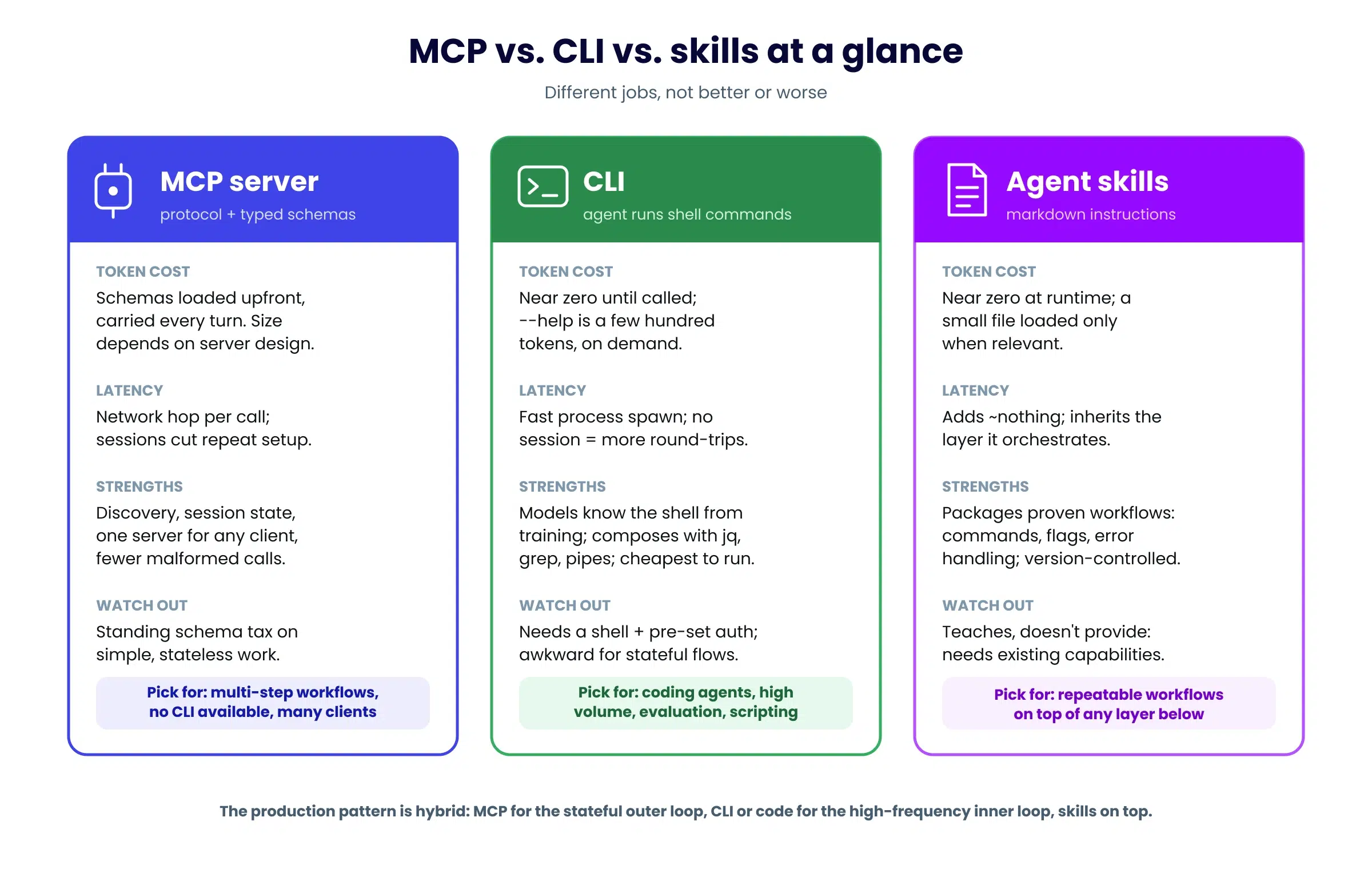
Here’s the honest breakdown.
The token math. When an agent connects to an MCP server, the tool definitions are loaded into the model’s context.
A single well-documented tool definition runs roughly 150 to 600 tokens. servers exposing dozens of tools might put tokens into context before the agent does anything, and that overhead is carried across the turns of the session.
A CLI, by contrast, costs nothing until called: the model already knows the pattern from training, and a –help lookup is a few hundred tokens on demand. Independent benchmarks through 2025 and 2026 consistently found order-of-magnitude differences in per-task token cost between heavy MCP setups and CLI equivalents, which, at production volume, translates directly into API spend.
Skills sit at the cheap end too: a small instruction file, loaded only when relevant.
Where latency comes from. Tokens are only one clock. Three things dominate an agent’s wall-clock time: the number of LLM round-trips, how much context the model processes per turn, and the tool’s own execution time. Interfaces shift these differently.
A CLI spawns a fresh process per call, milliseconds, but holds no session, so multi-step work means more round-trips.
A remote MCP server adds a network hop per call and schema weight per turn, but holds state, so multi-step flows repeat less setup.
Framework integrations and custom tools are in-process calls: effectively just the API’s own response time.
Structured data cuts the biggest cost of all: when a tool returns fields instead of a raw page, the agent skips entire parsing turns, and a smaller context generates faster.
And in most agent stacks, the slowest component isn’t the interface at all, but rather it’s a web fetch that retries, renders JavaScript, or fails and forces the loop to recover. That’s an access-layer property, which is why reliability and success rate matter more for wall-clock speed than the interface choice.
What MCP buys for that cost. Typed schemas that reduce malformed calls, runtime discovery when the agent doesn’t know upfront which tools it needs, session state for multi-step workflows, and a standard any client can consume.
The protocol is also improving fast: tool search and progressive disclosure patterns are actively shrinking the schema overhead, and the spec now sits under neutral governance with broad industry backing. The overhead is an engineering problem being engineered away, not a terminal flaw.
A practical decision guide:
Agent lives in a coding tool, and the target has a good CLI → use the CLI. Cheapest, most reliable, composable with the shell.
Service has no CLI, or you’re wiring many clients to one capability → MCP. Standardization and discovery are exactly what it’s for.
Multi-step, stateful workflows (search, then fetch, then compare) → MCP’s sessions and typed schemas earn their overhead.
You’ve solved a workflow once and want every agent run to follow it → write a skill. Near-zero cost, version-controlled, human-readable.
Cost-sensitive, high-volume, mostly stateless calls → CLI or a thin custom tool. Don’t pay a standing schema tax for work that’s one command.
The pattern that’s actually winning is hybrid. Production setups increasingly use MCP for discovery and the stateful outer loop, the CLI or generated code for the high-frequency inner loop, and skills as the layer that tells the agent which to reach for. The three aren’t competitors so much as different altitudes of the same stack. Pick per job, and prefer providers that expose the same capability at every layer, so switching interfaces later is a config change rather than a migration.
Routing by situation
To collapse all of the above into one decision list for web data specifically:
Building an agent inside Claude Code, Cursor, Windsurf, or Cline whose built-in fetch fails on protected sites → connect a web scraping MCP server, or install a scraping CLI if you’re optimizing token spend.
Building a LangChain app that needs to read live pages or get structured Google and Amazon data → the LangChain integration, two lines of code.
Building a LlamaIndex agent that needs live commerce, search, or real estate data as JSON fields → the LlamaIndex ToolSpec, one pip install.
Evaluating whether a data source is even reachable, and what it costs → the CLI, before you write any production code.
A capability unique to your product → a custom tool wrapping a web data API or SDK.
A workflow your team repeats → package it as a skill on top of whichever layer above you chose.
Get started
Everything in this article applies to whatever provider sits underneath your agent.
If you want one that covers all five layers on a single account and credit pool, ScraperAPI ships live web data through each of them:
- An API and SDKs to wrap in custom tools
- Pre-built LangChain and LlamaIndex integrations
- The sapi CLI (including sapi cost, which previews the exact credit cost of a request before you run it)
- A remote MCP server that connects in one config paste, and a Claude plugin with skills for repeatable workflows.
- And for sites outside the pre-built endpoints, the AI Parser extends the same principle to any domain: feed it a few example URLs and it generates a custom parser that returns structured JSON from every similar page on that site, no CSS selectors to write or maintain.
Underneath every layer, it’s the same web access: 40M+ proxies, CAPTCHA handling, JS rendering, structured JSON from Google, Amazon, Walmart, eBay, and Redfin, up to ~99% success rate, and a clear error when a page can’t be reached. Failed requests are retried automatically behind the scenes, so a blocked fetch doesn’t stall the agent loop or force extra recovery turns.
Explore the full picture, decide how you wish to leverage live web data for AI agents, and pick the integration that fits how you build at scraperapi.com/solutions/ai, or start a free trial and test it on your own target sites.