The best Firecrawl alternative depends on the job Firecrawl is failing at. Firecrawl is a web data API that turns URLs into Markdown or JSON, and it stays a good fit for public pages.
The nine tools below are split by job:
- Protected sites: ScraperAPI, Bright Data, and Zyte.
- Self-hosting: Crawl4AI removes per-page fees.
- Single URLs to Markdown: Jina Reader.
- Prompts to JSON: ScrapeGraphAI.
- Search plus extraction for agents: Tavily.
This guide sorts nine Firecrawl alternatives by job, with prices read from each vendor’s official page.
Key takeaways
- Why you might need an alternative: Firecrawl’s extra credits for structured formats, self-hosted anti-bot work, unsupported sites, two-day cache, and bulk crawl costs are the five reasons teams look elsewhere.
- How the nine compare: The table puts each tool’s output formats, job, entry price, and free option side by side, with Firecrawl as the reference row.
- ScraperAPI: Firecrawl charged 1 credit per page in our tests against 10 for ScraperAPI’s JavaScript rendering, yet ScraperAPI’s credits cost less ($0.49 per 1,000 on Hobby and $0.44 billed annually, against $0.99 on Firecrawl Standard) and it returned a Reddit thread that Firecrawl refused. Try ScraperAPI today.
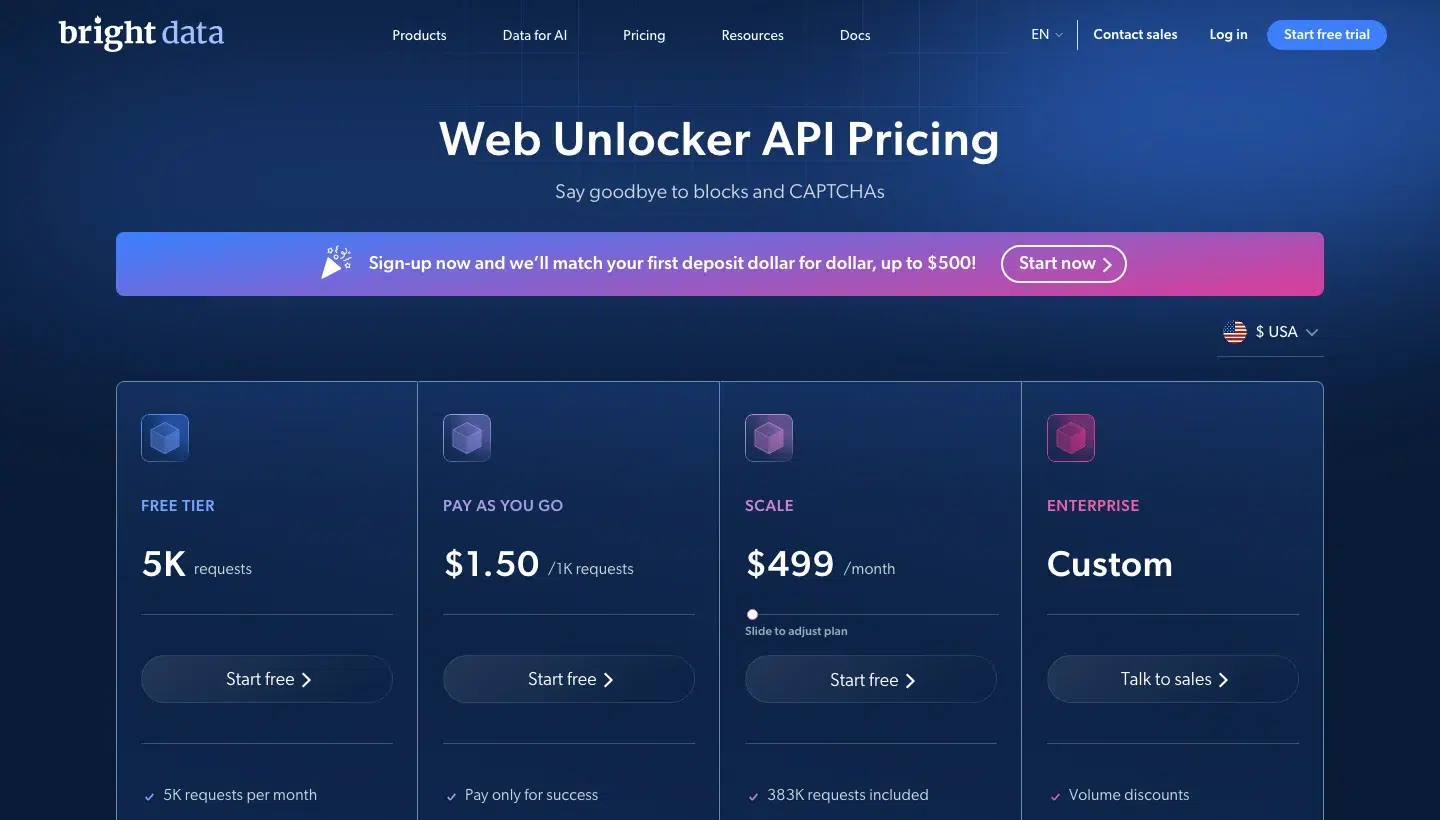
- Bright Data: Web Unlocker charges only for successful requests from $1.50 per 1,000, with 5,000 free requests a month shared across its products.
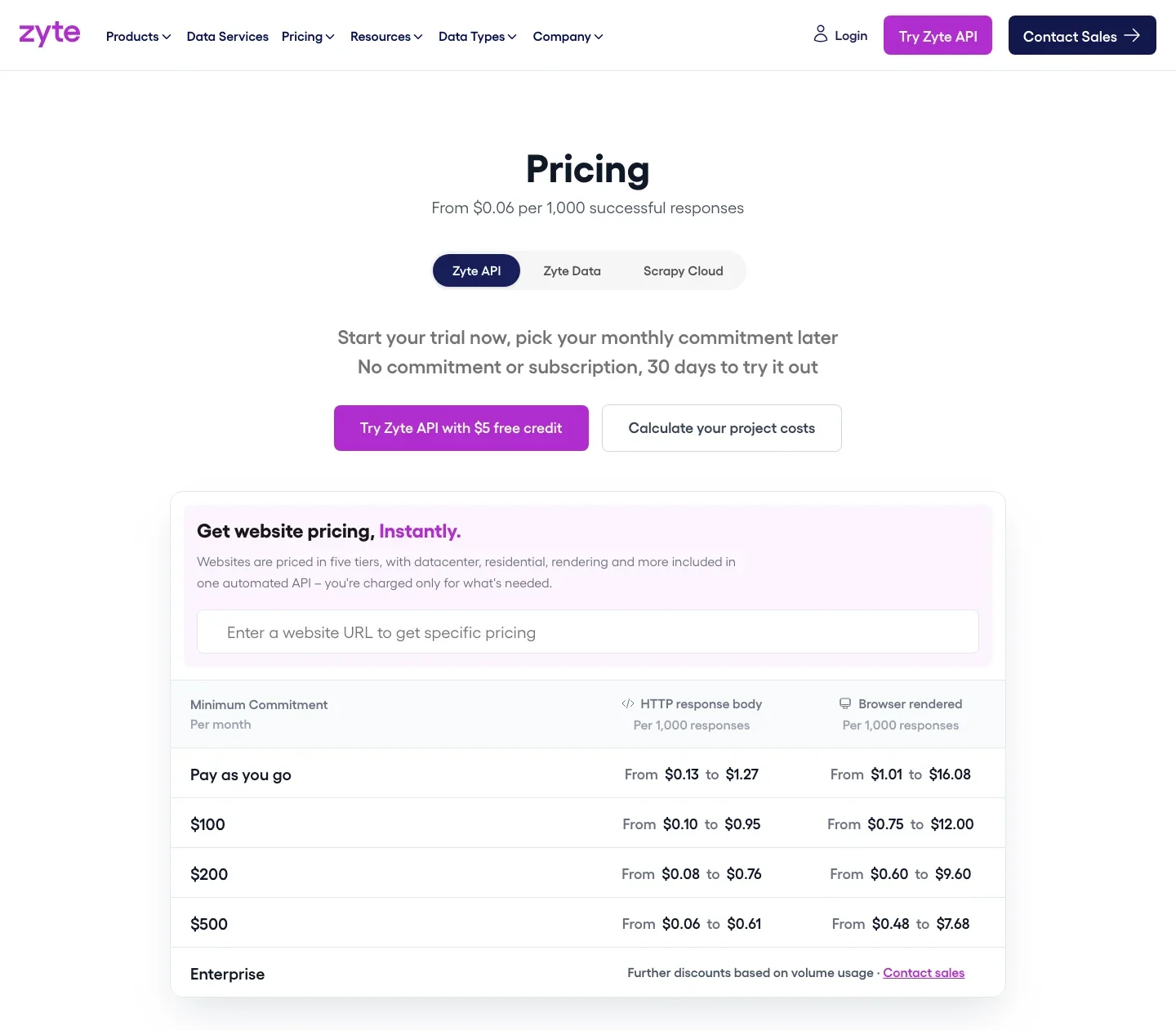
- Zyte: Zyte prices each website in one of five tiers, charges only for successful responses, and returns typed JSON for products and articles.
- ScrapingBee: ScrapingBee fits configurable single-page scraping with JavaScript scenarios and up to 900 concurrent requests, from $19 a month for 75,000 credits.
- Apify: Apify sells ready-made Actors and RAG-ready crawls, billed in compute units from $19 a month.
- Crawl4AI: Crawl4AI has no per-request fees on your own server, and you supply the proxies and the maintenance.
- Jina Reader: Jina Reader turns one URL into Markdown through
r.jina.ai, free for basic use and with no anti-bot bypass. - ScrapeGraphAI: ScrapeGraphAI extracts JSON from a plain-English prompt with no selectors, for $20 a month for 10,000 credits.
- Tavily: Tavily combines search with extraction for agents and includes 1,000 free credits a month.
- Choosing: Pick ScraperAPI, Bright Data, or Zyte for protected sites, Crawl4AI for self-hosting, and Tavily, Jina Reader, or ScrapeGraphAI for agents and extraction.
Why might you need a Firecrawl alternative?
Five common friction points arise from official vendor documentation and discussion across developer forums, where engineering teams evaluating web data infrastructure outline shared challenges. Every bottleneck carries a clear technical root cause along with measurable resource costs for engineering teams.
- Structured extras add credits: A basic scrape costs 1 credit, but the JSON, question, and highlight formats add 4 credits per page. A job that costs 100,000 credits as Markdown costs 500,000 as typed JSON, which moves you up a plan.
- Advanced anti-bot is yours to run when you self-host: Firecrawl’s core is AGPL-3.0, and its documentation says advanced anti-bot services must be run and configured separately. r/LocalLLaMA users report that most VPS providers prohibit scraping and that the self-hosted version offers “zero visibility”, so IP bans and proxy costs land on your team.
- Some sites aren’t supported: A Reddit thread returned HTTP 403 “we do not support this site” on all four of our runs. Firecrawl also sends x.com requests through the Grok API and LinkedIn requests to third-party data providers, both priced separately, so you need a second fetch layer for those targets.
- Cached copies can be up to two days old: Firecrawl returns a cached copy of a page by default when it is newer than two days (
maxAgeof 172,800,000 ms), and forcing a fresh fetch withmaxAge: 0makes the request slower and, in Firecrawl’s words, “more likely to fail”. For price tracking, stock levels, or news, a two-day-old page is a wrong answer delivered quickly. - Bulk crawling gets costly: In a year-old r/n8n thread, a poster crawling 20,000 to 30,000 domains a month estimated about $400 a month on the API, and a commenter called the tool “a luxury” for bulk work while suggesting self-hosted Crawl4AI instead. That is two users’ views from before Firecrawl’s September 2026 price change, and per-domain selector upkeep stays whichever tool you pick.
Firecrawl also has real strengths. In a 100-URL test posted on r/WebScrapingInsider, Firecrawl returned usable output on 93 URLs, Tavily on 87, and Jina Reader on 77.
The sample is small, and the poster’s own result.
How do the nine Firecrawl alternatives compare?
The table lists each tool’s output formats, the job it does, and its entry price in the unit the vendor bills.
| Tool | Output | Job | Entry price and billing unit | Free option |
|---|---|---|---|---|
| Firecrawl (reference) | Markdown, JSON, HTML, raw HTML, links, images, screenshots, summary, branding, and more (over a dozen scrape formats in all) | Search, scrape, crawl, map, monitor, interact, agent, parse | Hobby $19 a month, 5,000 credits (1 credit per basic page) | 1,000 credits a month |
| ScraperAPI | HTML, Markdown, text, JSON, CSV | Crawl, unblock, extract, scale, schedule | Hobby $49 a month ($44.10 billed annually, 10% off), 100,000 API credits | 7-day trial with 5,000 credits, then 1,000 credits a month |
| Bright Data | HTML, JSON, Markdown, screenshot | Unblock | $1.50 per 1,000 requests, pay as you go | 5,000 requests a month, one pool shared across its products |
| Zyte | HTTP body, browser HTML, Markdown, JSON | Unblock, extract | From $0.13 per 1,000 successful responses | $5 free credit, 30 days |
| ScrapingBee | HTML, Markdown, text, JSON | Fetch single pages | Hobby $19 a month, 75,000 API credits | 1,000 credits |
| Apify | Markdown, text, HTML, JSON, CSV | Crawl, extract | Starter $19 a month plus pay-as-you-go, $0.2 per compute unit | Free plan, $5 of usage |
| Crawl4AI | Markdown, JSON, HTML, PDF | Self-hosted crawl | Library free; Cloud Starter $10 a month, 10,000 credits | Library; Cloud 1,000 credits a month |
| Jina Reader | Markdown, HTML, text, JSON, screenshot, pageshot, frontmatter | Single URL to Markdown | $50 for 1 billion tokens | Free basic use; 10M tokens, non-commercial |
| ScrapeGraphAI | Markdown, HTML, links, images, summary, JSON, branding, screenshot | Prompt-to-JSON extraction | Starter $20 a month, 10,000 credits | 500 credits, one time |
| Tavily | Markdown, text, search results with snippets or raw content and images, URL lists, cited answers | Search plus extract | $0.008 per credit pay-as-you-go | 1,000 credits a month |
1. ScraperAPI: Best for protected sites, HTML or JSON output, and scheduled volume
ScraperAPI is web data infrastructure for developers and data teams who want one vendor to handle blocking, retries, and site changes, from a first API call to scheduled production feeds.
You send a URL to ScraperAPI’s Scraping API and get HTML, Markdown, or text back, or you call a Structured Data Endpoint for typed JSON from sources such as Amazon, Google, Walmart, eBay, and Redfin, so the page comes back in whatever format your pipeline needs.
ScraperAPI isn’t built for teams that want standalone proxies or per-GB plans, and its credit cost varies by target, so one flat price per page isn’t on offer.
Agent-ready by default, it ships an MCP server, a CLI, a plugin for AI agents, and integrations for n8n, Zapier, LangChain, and LlamaIndex.
A single call returns Markdown from a JavaScript-rendered page, and the sa-credit-cost response header shows what it cost:
import requests

payload = {
    "api_key": "YOUR_API_KEY",
    "url": "https://quotes.toscrape.com/js/",
    "render": "true",
    "output_format": "markdown",
}
response = requests.get("https://api.scraperapi.com/", params=payload)

print(response.status_code, response.headers.get("sa-credit-cost"))
print(response.text[:300])
ScraperAPI top features:
- ScraperAPI’s JavaScript rendering with
render=truefor pages built in the browser. - ScraperAPI’s premium and ultra premium levels for protected sites, chosen per request.
- HTML, Markdown, text, JSON, and CSV output, so the page comes back in whatever format your pipeline needs.
- Structured Data Endpoints for Amazon, Google, Walmart, eBay, Home Depot, and Redfin, plus ChatGPT, Perplexity, Gemini, and Google AI Mode.
- ScraperAPI acquired Traject Data, and if your use case needs dedicated depth on one source, its products are separate from ScraperAPI, each with its own plans and billing: Rainforest API by ScraperAPI for Amazon, SerpWow API by ScraperAPI for Google and Bing, BlueCart API by ScraperAPI for Walmart, Countdown API by ScraperAPI for eBay, and RedCircle API by ScraperAPI for Target.
- ScraperAPI’s Async API for up to 50,000 URLs per job, with automatic retries.
- ScraperAPI’s DataPipeline for scheduled projects of up to 100,000 URLs, keywords, or ASINs.
- ScraperAPI’s cost controls:
max_coststops a request that would exceed your limit, and a URL cost estimator returns the credits before you send. - ScraperAPI’s Rendering Instruction Set for clicks, text input, and waits on a page.
- ScraperAPI’s MCP server, which gives agents in Claude Code, Cursor, Windsurf, and Cline a scrape tool, a crawler, and typed tools for Google, Amazon, Walmart, eBay, and Redfin.
ScraperAPI pros and cons:
| Pros | Cons |
|---|---|
| ScraperAPI’s Amazon Product endpoint returns 32 typed fields for 5 credits, without a schema to write. | G2 reviewers say credit costs add up when premium parameters are used. |
| ScraperAPI fetched a Reddit thread that Firecrawl refused, at 10 credits on the plain level. | One G2 reviewer reports occasional rate limiting and failed requests at peak load. |
| ScraperAPI’s Async API and DataPipeline cover scheduled and bulk jobs. |
ScraperAPI pricing
- Billing unit: ScraperAPI bills from a monthly credit pool, and a plain request costs 1 credit.
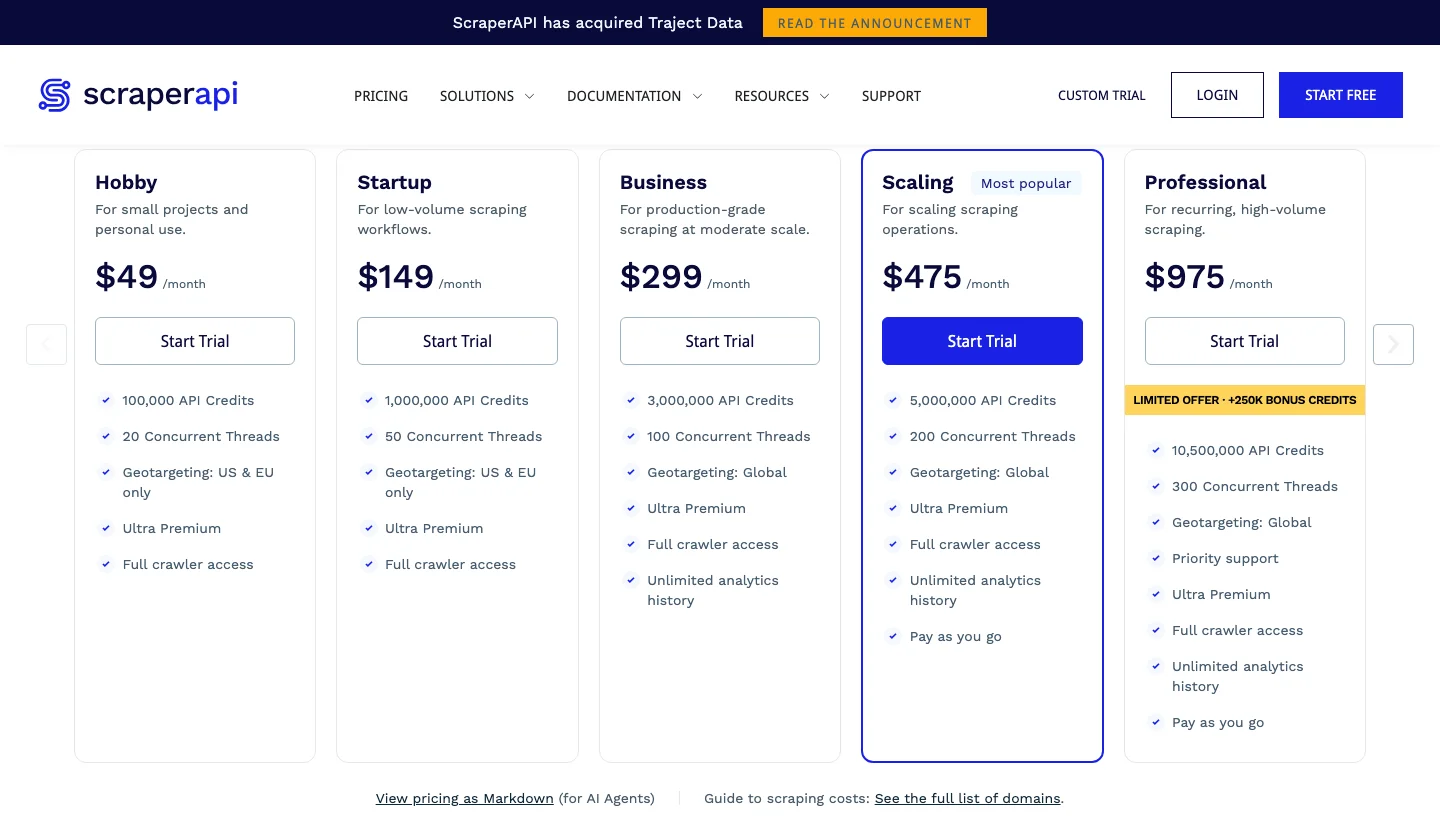
- Plans: ScraperAPI’s six self-serve plans run from Hobby at $49 a month ($44.10 a month billed annually) for 100,000 credits to Advanced at $1,975 a month ($1,777.50 billed annually) for 21,500,000 credits, with Enterprise on custom terms, so a team can scale to $1,975 a month before talking to sales.
- Annual billing: ScraperAPI’s annual billing takes 10% off every plan: Startup is $149 ($134.10), Business $299 ($269.10), Scaling $475 ($427.50), and Professional $975 ($877.50).
- Free option: ScraperAPI’s 7-day trial includes 5,000 credits and needs no credit card, and a free plan of 1,000 credits a month follows it.
- Pay-as-you-go: ScraperAPI’s pay-as-you-go starts on the Scaling plan ($475 for 5,000,000 credits), where it switches on after the monthly credits run out.
See ScraperAPI pricing.
How does ScraperAPI compare with Firecrawl on the same five URLs?
We sent the same five URLs through both tools in four runs on 5 November 2026 and read the credits from each response. Firecrawl charged 1 credit on every page it returned, in 4 of 4 runs, and returned an empty page on the JavaScript test in three of the four.
ScraperAPI’s plain level returned an empty page on the JavaScript test, and render=true fixed it for 10 credits.
On the Cloudflare test page, ScraperAPI’s plain level returned HTTP 500 with no charge in 2 of 4 runs and passed in the other two, and ultra premium passed 4 of 4 at 30 credits.
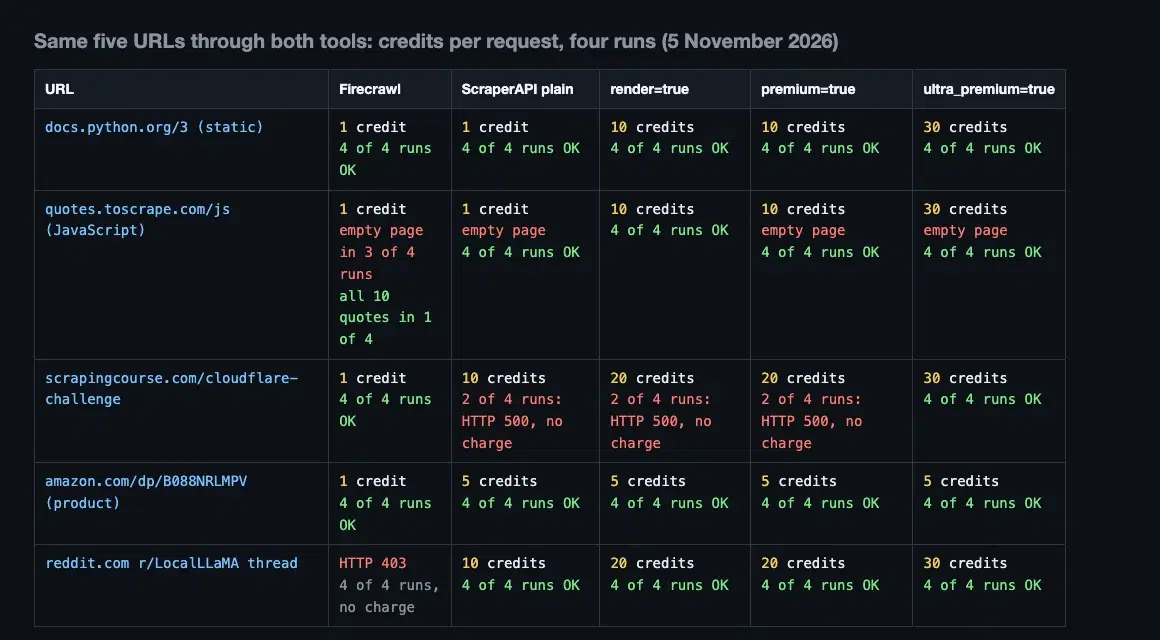
Firecrawl was the lower price per page on the JavaScript page, the Cloudflare page, and the Amazon product page.
It returned HTTP 403 on the Reddit thread in 4 of 4 runs, while ScraperAPI’s plain level returned it at 10 credits.
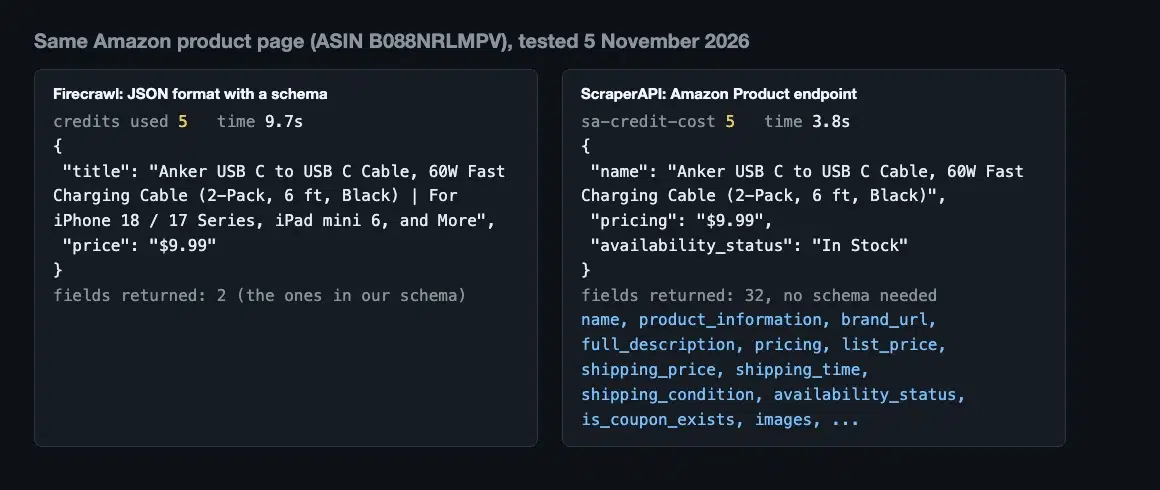
On typed JSON from the same Amazon page, Firecrawl returned the two fields in its schema for 5 credits, and ScraperAPI’s Amazon Product endpoint returned 32 fields for 5 credits.
2. Bright Data: Best for enterprise unblocking with pay-for-success billing
Bright Data’s Web Unlocker API is built for engineering teams that don’t have a scalable proxy and unblocking stack, and for production workloads that need predictable pay-per-success costs.
One call returns HTML, JSON, Markdown, or a screenshot after proxy rotation, CAPTCHA solving, and JavaScript rendering.
Bright Data also sells a Crawl API, a SERP API, a Browser API, Scraper APIs, Scraper Studio, Datasets, a Data Firehose, an Agent Browser, Search and Extract, and an MCP server.
Web Unlocker can’t click, scroll, or fill forms, because it returns the content of a single request, and Bright Data points to its SERP API for Google, Bing, DuckDuckGo, and Yandex.
Bright Data top features:
- Automatic bot-detection bypass, CAPTCHA solving, and proxy rotation in one call, though G2 reviewers call Bright Data expensive for smaller teams.
- Built-in JavaScript rendering, which launches automatically when a site needs it.
- Markdown output through
data_format: 'markdown'. - A residential pool that Bright Data’s product page puts at more than 400 million IPs, although r/ProxyEngineering users say new Residential zones now need a human-reviewed KYC check with a registered company and a corporate email, which is hard for freelancers and solo developers.
- A Web Unlocker success rate that Bright Data’s docs put at 98%.
- Scraper APIs that return structured JSON, NDJSON, or CSV, though G2 reviewers mention limited guidance on tool selection and delays when downloading large snapshots.
- A Browser API for multi-step flows with Puppeteer, Selenium, and Playwright, which G2 reviewers say comes with a learning curve for advanced features.
- An MCP server that draws on the same 5,000 free requests a month as Bright Data’s other products.
Bright Data pros and cons:
| Pros | Cons |
|---|---|
| Unlimited concurrency on pay-as-you-go and Scale. | G2 reviewers call Bright Data expensive for smaller teams. |
| Billing is per successful request on Web Unlocker. | G2 reviewers describe a learning curve for advanced features and unclear guidance on which tool to use. |
| One vendor covers unblocking, SERP, scraping, and browsers. | G2 reviewers mention limited guidance on tool selection and delays when downloading large snapshots. |
For a closer look at the full product range, see our guide to Bright Data alternatives.
Bright Data pricing
- Billing unit: Web Unlocker and the SERP API bill per 1,000 requests and charge only for success, Scraper APIs bill per 1,000 records, and the Browser API bills per GB.
- Free tier: One pool of 5,000 requests a month, shared across Web Unlocker, the SERP API, Scraper APIs, Scraper Studio, the Browser API, and the MCP server.
- Pay-as-you-go: $1.50 per 1,000 requests.
- Scale: A slider with three steps, all with unlimited concurrency: $499 a month with 383,000 requests included and $1.30 per 1,000 after that, $999 with 908,000 and $1.10, and $1,999 with 2,000,000 and $1.00.
- Enterprise: Custom terms.
See Bright Data’s Web Unlocker pricing.
3. Zyte: Best for per-site-tier pricing with typed extraction
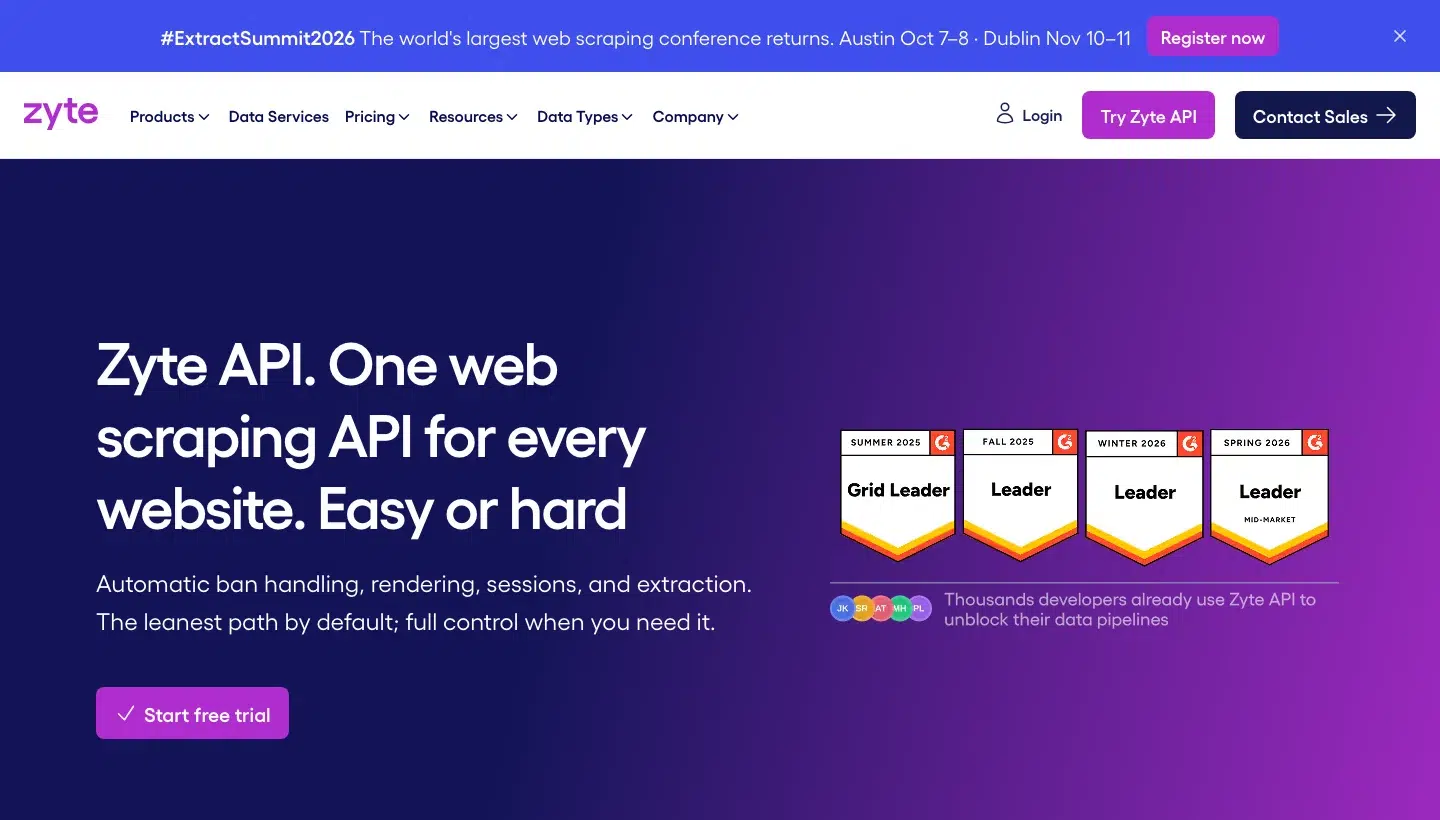
Zyte API is built for teams that want to scrape any website at scale with automatic proxy rotation and ban handling, with pricing and assortment monitoring and SERP intelligence among its listed use cases.
One API picks the proxy and rendering for each site and returns the HTTP body, browser-rendered HTML, a screenshot, Markdown, or typed JSON for products and articles.
It suits teams that accept a price that depends on the target, because Zyte prices each website in one of five tiers.
Zyte top features:
- Automatic choice of proxy type and rendering for each site.
- Markdown output, covering the main content by default and built from the browser-rendered page when you set
browserHtml. - Automatic extraction to typed JSON for article, article list, article navigation, forum thread, job posting, job posting navigation, product, product list, product navigation, and SERP pages, plus custom attributes.
- Browser actions: click, doubleClick, evaluate, goto, hide, hover, interaction, keyPress, reload, scrollBottom, scrollTo, searchKeyword, select, setLocation, type, waitForNavigation, waitForRequest, waitForResponse, waitForSelector, and waitForTimeout.
- Screenshots at $1.34 per 1,000.
- A rate limit of 3,000 requests a minute on standard plans and 10,000 on Enterprise.
- No charge for rate-limit responses (429 and 503) or unsuccessful responses.
- An MCP server that returns pages as Markdown, HTML, or a screenshot, and also searches, extracts in plain language, checks prices, reports usage, and runs Scrapy Cloud jobs, for Claude Code, Codex CLI, GitHub Copilot CLI, VS Code, and a Claude custom connector.
Zyte pros and cons:
| Pros | Cons |
|---|---|
| Zyte charges only for successful responses. | G2 reviewers say costs add up at scale. |
| Markdown, typed JSON, and screenshots come from one API. | G2 reviewers find usage-based pricing hard to predict. |
| Rate-limit responses (429 and 503) aren’t charged. | G2 reviewers describe a steep learning curve for custom extraction. |
Zyte pricing
- Billing unit: Zyte bills per 1,000 successful responses (“we charge only for successful responses”), with separate ranges for HTTP response body and browser-rendered output.
- Plans: Pay-as-you-go with no minimum, plus monthly commitment tiers and Enterprise.
- Free option: New accounts get a $5 free credit and 30 days to try it.
See Zyte pricing.
4. ScrapingBee: Best for configurable single-page scraping with high concurrency
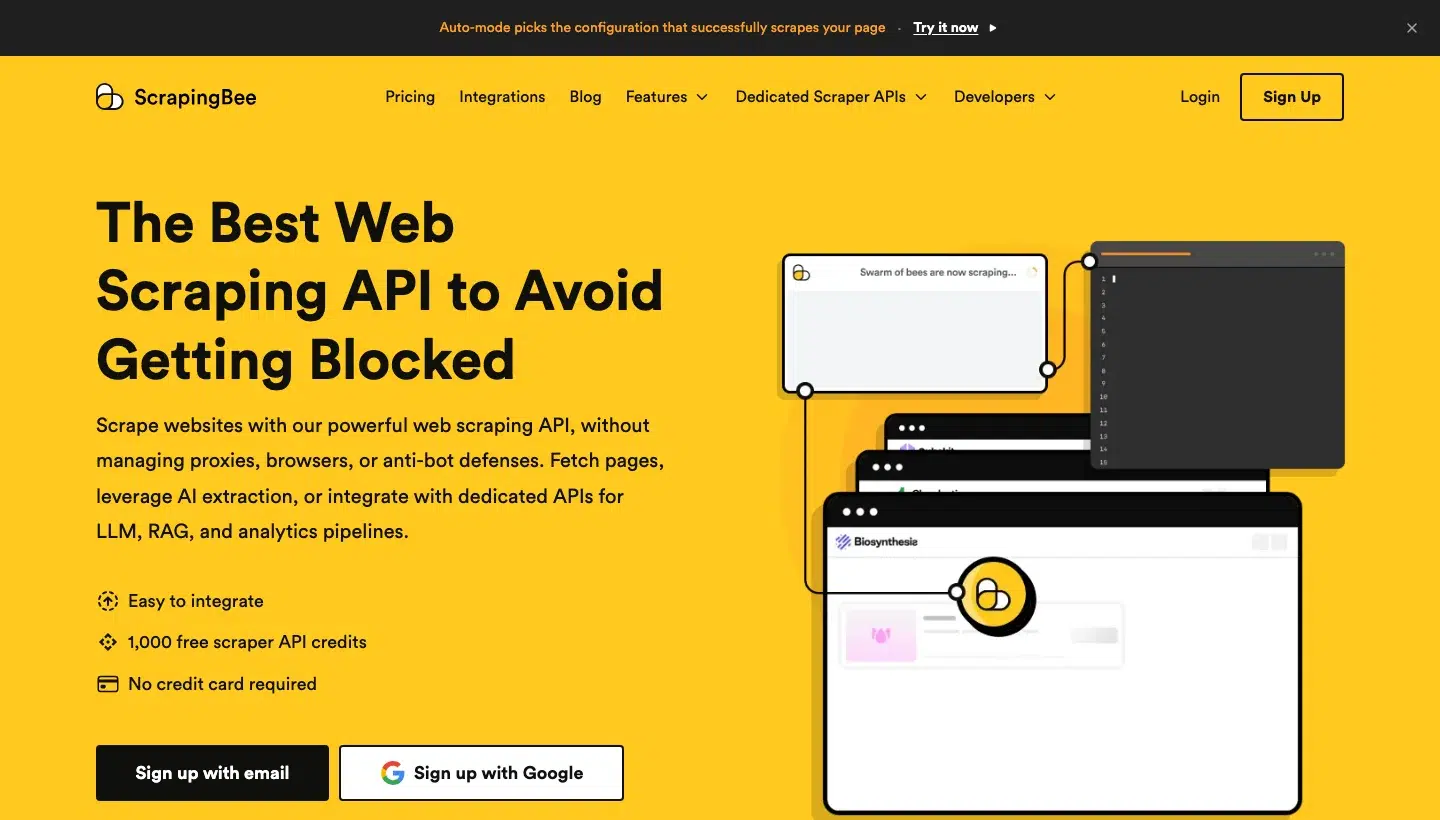
ScrapingBee is built for developers, founders, and product teams that need web data in an app, workflow, or internal tool, and it fits configurable page scraping, location-dependent targets, and high request concurrency.
One API call returns HTML, Markdown, text, JSON, or a screenshot, with JavaScript scenarios that click, wait, scroll, fill forms, evaluate scripts, and scroll infinite pages (click, wait_for, wait_for_and_click, wait, scroll_x, scroll_y, fill, evaluate, and infinite_scroll).
ScrapingBee describes itself as focused on retrieving individual pages, and says it “is not a drop-in replacement for the Firecrawl API”, so it isn’t built for crawling whole sites.
ScrapingBee top features:
- JavaScript rendering in headless Chrome, with waits for selectors and browser events.
- Rotating, premium residential, and stealth proxies, with geotargeting to more than 200 countries and territories.
- Output as HTML, Markdown, text, structured JSON, and screenshots.
- AI extraction that returns JSON from a plain-English description, at 5 extra credits.
- Auto Mode, which goes from the cheapest to the most expensive configuration and charges only for the one that succeeds.
- Concurrent requests from 25 on Hobby to 900 on the largest Enterprise plan.
- A remote MCP server that uses the same credits as the underlying API call, with 18 tools: fast_search, get_google_search_results, get_page_text, get_page_html, extract_page_data, get_screenshot, get_file, get_scrapingbee_usage, get_amazon_search_results, get_amazon_product_details, get_amazon_pricing, get_walmart_search_results, get_walmart_product_details, ask_chatgpt, ask_gemini, get_youtube_search_results, get_youtube_video_metadata, and get_youtube_video_subtitles.
ScrapingBee pros and cons:
| Pros | Cons |
|---|---|
| JavaScript rendering, proxies, and screenshots are included on every plan. | G2 reviewers say credit cost is hard to estimate when rendering, proxy, and scenario options combine. |
| Concurrency reaches 400 requests on Business+. | G2 reviewers report that stealth proxies use credits fast. |
| A dedicated Scraping API sits behind the same key. |
Readers comparing more options can start with our guide to ScrapingBee alternatives and its ZenRows counterpart.
ScrapingBee pricing
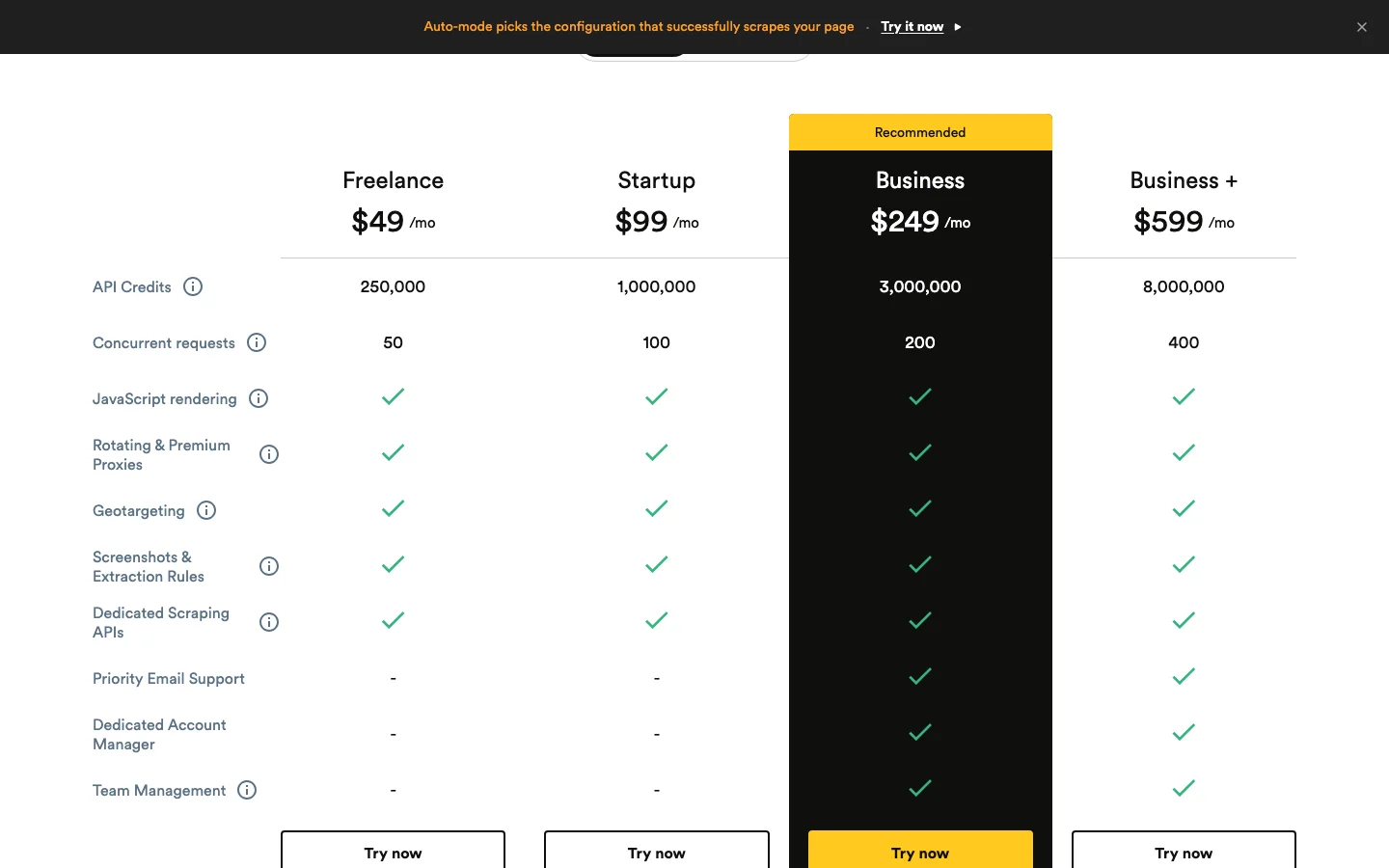
- Billing unit: ScrapingBee bills in API credits, and “each successful request with JS rendering enabled costs 5 API credits”.
- Credits per request: 1 credit, 5 with JavaScript rendering, 10 or 25 with premium proxies, and 75 with stealth proxies and JavaScript rendering.
- Plans: Hobby at $19 a month for 75,000 credits and 25 concurrent requests, Freelance ($49, 250,000), Startup ($99, 1,000,000), Business ($249, 3,000,000), and Business+ ($599, 8,000,000).
- Enterprise tiers: Enterprise 14 ($999, 14,000,000 credits, 500 concurrent), Enterprise 24 ($1,599, 24,000,000, 600), Enterprise 41 ($2,399, 41,000,000, 700), Enterprise 69 ($3,599, 69,000,000, 800), and Enterprise 120 ($5,799, 120,000,000, 900).
- Free trial: 1,000 credits with no card.
See ScrapingBee pricing.
5. Apify: Best for ready-made Actors and RAG-ready crawls
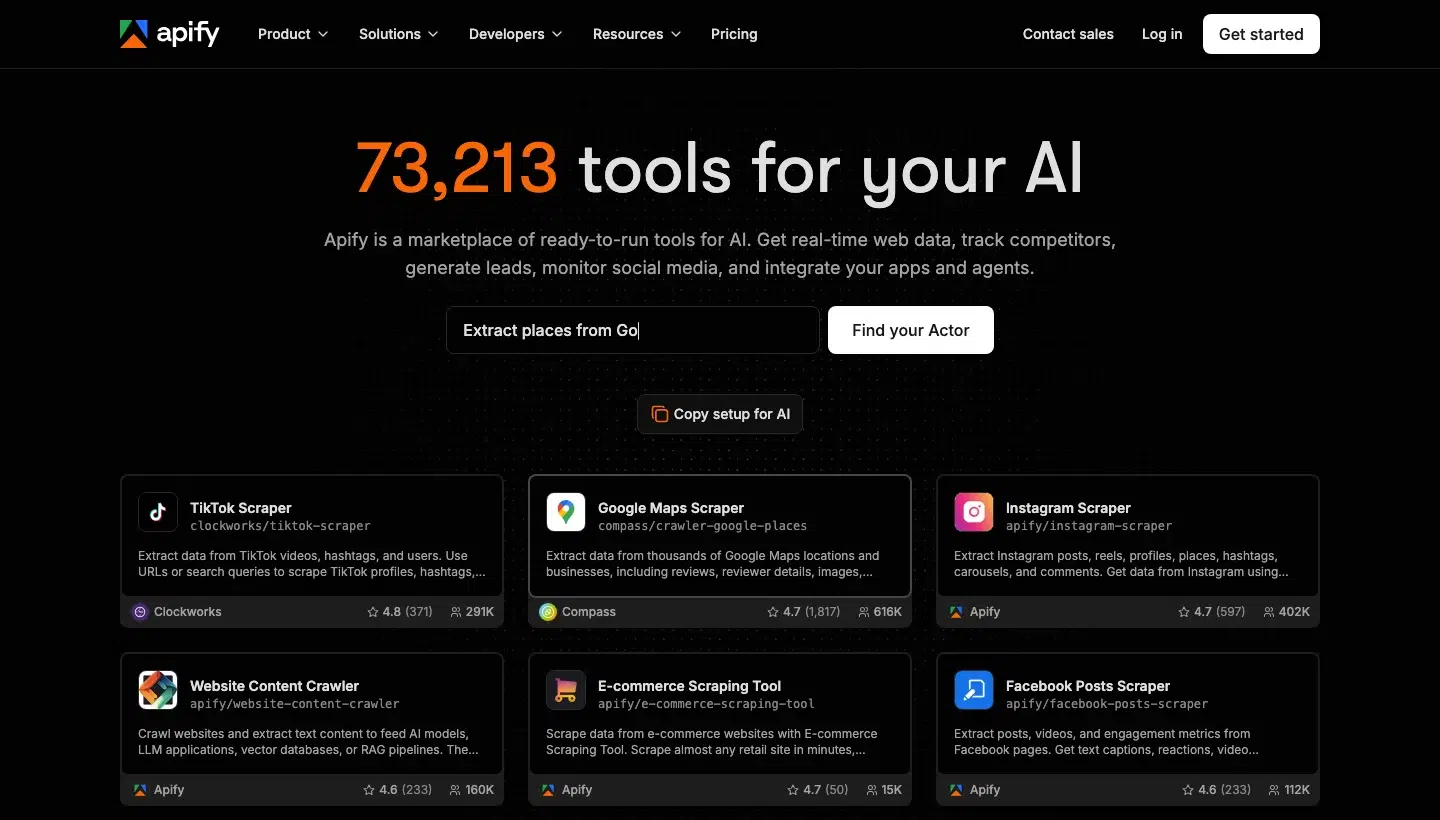
Apify is a marketplace of ready-to-run tools, called Actors, for AI data, lead generation, and market research.
For Firecrawl-style work, its RAG Web Browser Actor searches Google, scrapes the top pages in a full browser, and returns Markdown, while its Website Content Crawler crawls multi-page sites into Markdown, text, or HTML.
The RAG Web Browser searches Google in the US and in English.
Apify top features:
- More than 123,000 Actors in Apify Store, plus your own Actors.
- A RAG Web Browser Actor that returns Google results and page content as Markdown, plain text, HTML, or a list of links.
- A Website Content Crawler that outputs plain text, Markdown, or HTML, with a page screenshot, metadata, and an optional AI summary, and that can save PDF, DOC, DOCX, XLS, and XLSX files and other content types you choose.
- Results stored in a dataset that exports to JSON, JSONL, CSV, HTML, XLSX, XML, or RSS.
- An Apify MCP server that can load the RAG Web Browser Actor.
- Memory per run from 128 MB up to 16,384 MB on the Free plan and 32,768 MB on Starter.
- Apify Proxy rates on the pricing page, including residential at $8 per GB on Free and Starter.
Apify pros and cons:
| Pros | Cons |
|---|---|
| Reddit practitioners recommend Apify more than any other alternative, in five of the 13 threads we read. | Billing in compute units (1 GB of RAM for one hour) takes arithmetic, which one r/n8n user called a reason to look elsewhere. |
| Ready-made Actors cover sites beyond generic crawling. | G2 reviewers say compute costs climb fast on large jobs or many parallel Actors. |
| Pay-as-you-go applies on all paid plans. | G2 reviewers describe a steep learning curve, with confusing debugging and error logs. |
Our guide to Apify alternatives goes deeper on this model.
Apify pricing
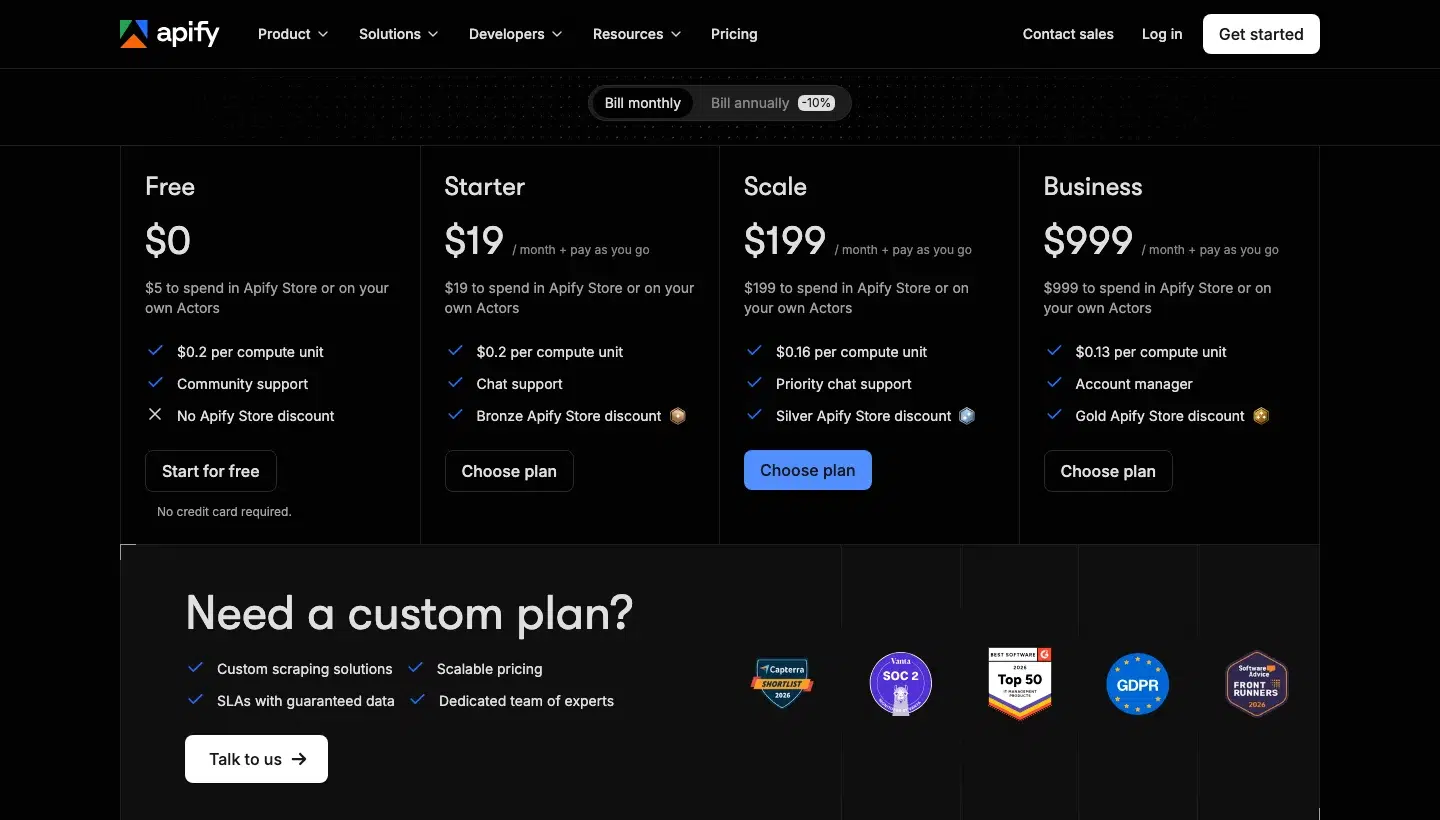
- Billing unit: Compute units, where 1 GB of RAM for one hour is one unit, and Actors in Apify Store use their own pricing models on top.
- RAG Web Browser: From $1.33 per 1,000 fetched pages.
- Free plan: $0 with $5 of usage and no card.
- Paid plans: Starter is $19 a month plus pay-as-you-go at $0.2 per compute unit, Scale is $199 ($0.16), Business is $999 ($0.13), and Enterprise is custom.
See Apify pricing.
6. Crawl4AI: Best for self-hosting open-source
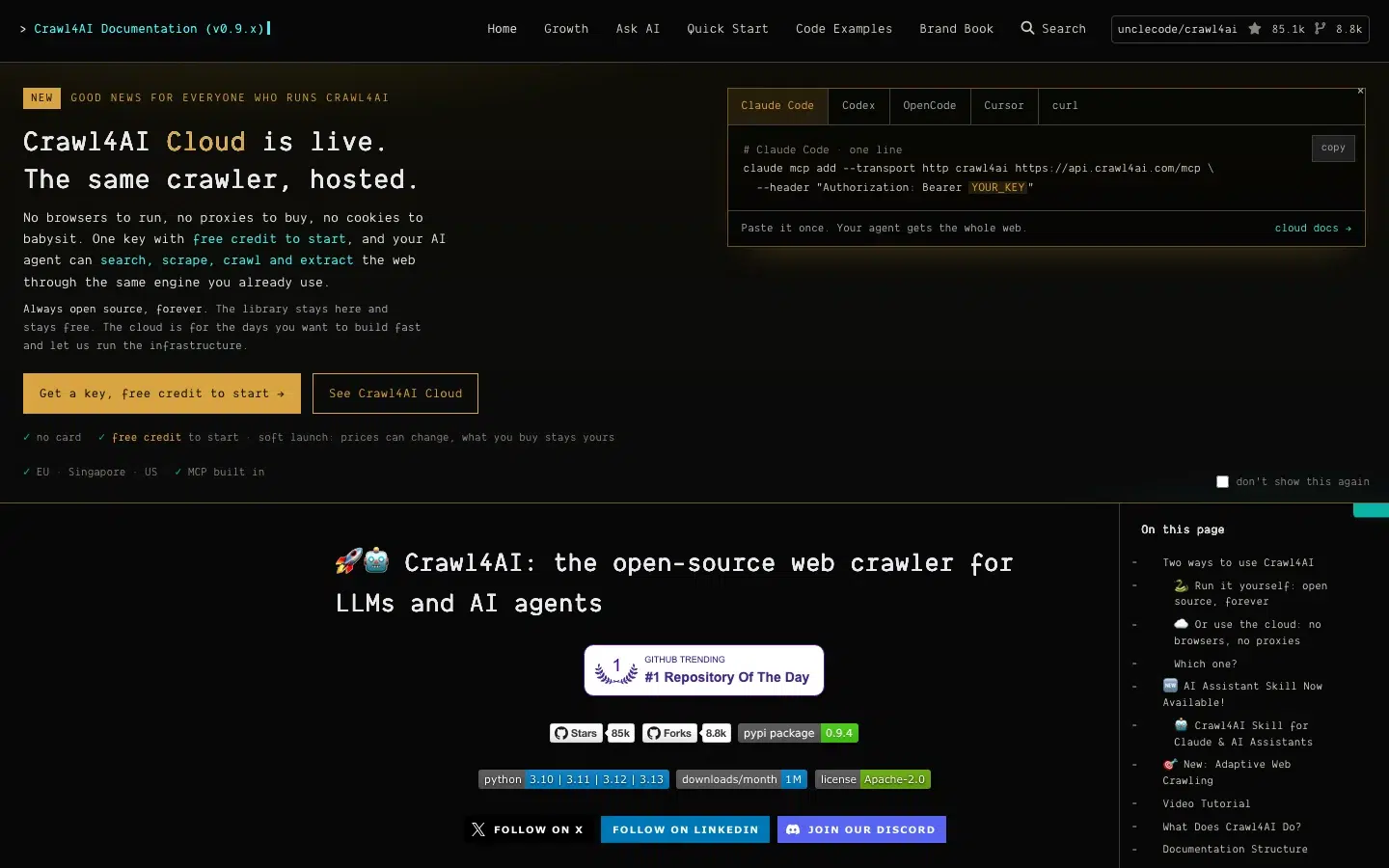
Crawl4AI is “the open-source web crawler for LLMs and AI agents”, and it runs as a Python library, on your own Docker server, or on a hosted Cloud.
It returns clean Markdown, typed JSON through CSS, XPath, regex, or LLM extraction, screenshots, and PDFs.
Bot walls on the library and the self-hosted server are left to “your settings, your proxies”, so it isn’t built for teams that don’t want to run proxies or a server.
Crawl4AI top features:
- Chromium, Firefox, and WebKit rendering, with scrolling for infinite pages.
- A layered retry and fallback system that detects 403 and 429 responses, challenge pages, CAPTCHA injection, and firewall blocks (Imperva, Sucuri), configured with
proxy_config,max_retries, andfallback_fetch_function. - An ordered
proxy_configlist for your own proxies. - A self-hosted REST API with
/md,/html,/crawl,/crawl/stream,/screenshot,/pdf, and/execute_jsendpoints. - An MCP server in Docker over SSE and WebSocket, and a hosted MCP endpoint on Cloud at
api.crawl4ai.com/mcpwith 25 tools for Claude Code, Codex, Cursor, and OpenCode. - LLM extraction into a typed JSON schema with any LLM provider.
- Cloud endpoints for scrape (including batch and jobs), search, SERP (beta), answer (experimental), extract, scan, price, lead, site, recipes, and monitors.
Crawl4AI pros and cons:
| Pros | Cons |
|---|---|
| No per-request fees on your own infrastructure, and more than 87,000 GitHub stars. | One r/n8n commenter says it is less intuitive than paid tools, second-hand. |
| Free library with a hosted Cloud option when you want to stop running browsers. | r/n8n users note that scraping at scale means building rotating proxies and per-site rules yourself. |
| r/n8n users run it on a €10 to €15 VPS. |
Crawl4AI pricing
- Library and Docker server: Free, under the Apache 2.0 licence, with a licence file that adds an attribution line for public use.
- Latest release: v0.9.5 from 14 October 2026.
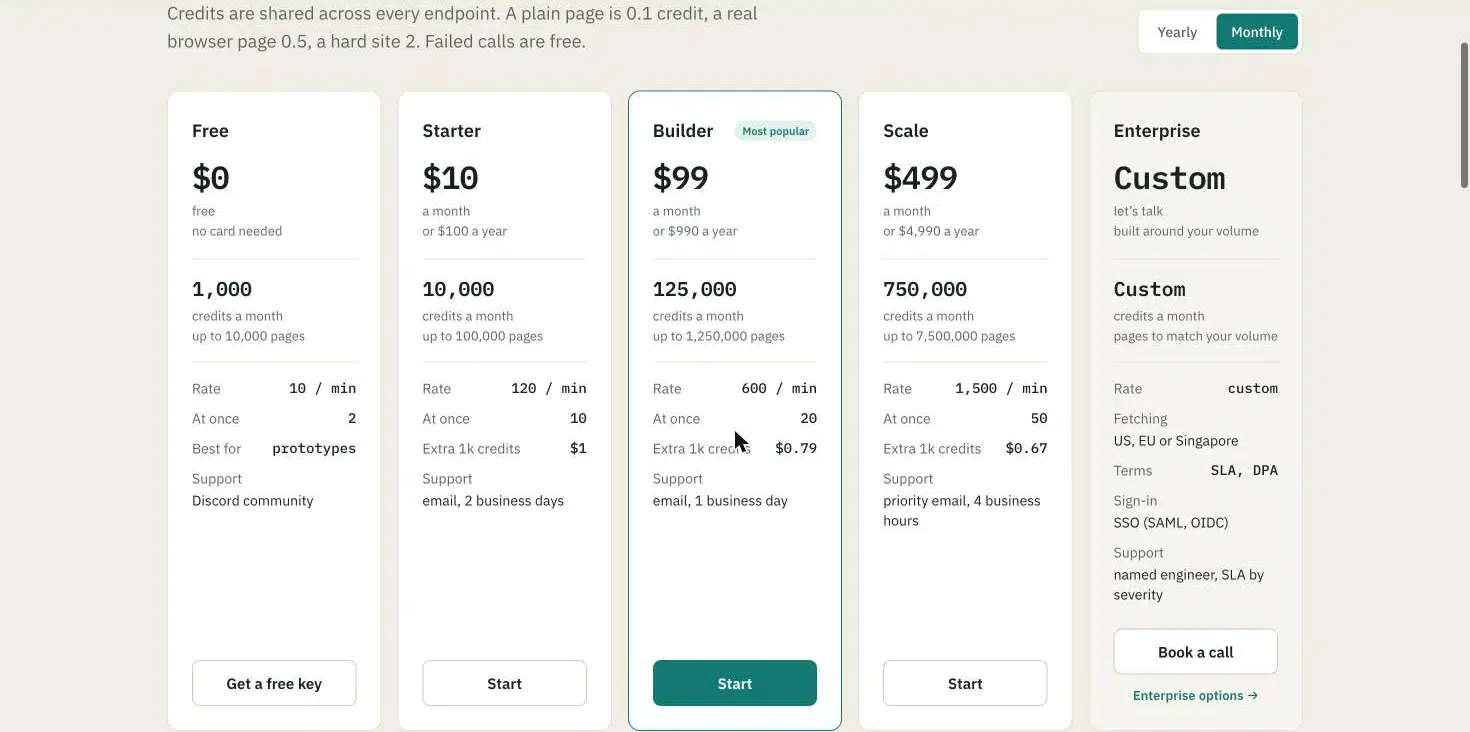
- Cloud billing unit: Credits, where 1 credit is $0.001 and a plain page costs 0.1 credit, a page in a real browser 0.5, and a hard site 2.
- Cloud plans: Free gives 1,000 credits a month, Starter is $10 for 10,000, Builder is $99 for 125,000, and Scale is $499 for 750,000.
See the Crawl4AI Cloud pricing.
7. Jina Reader: Best for quick URL-to-Markdown conversion
Jina Reader converts a URL to LLM-friendly input when you prepend r.jina.ai, and Jina describes it as developer infrastructure for building your own search, RAG, and agent systems.
It returns Markdown by default, JSON through the Accept header, reads PDFs natively, and can run a search through s.jina.ai.
It isn’t built for getting past anti-bot protection, because the page says Reader “does not actively circumvent or bypass any website defense mechanisms”, and interactive logins are out of scope.
Jina Reader top features:
- Markdown output by default, with HTML, text, screenshot, pageshot, and frontmatter through
x-respond-with, and JSON through theAcceptheader. - Headless-browser rendering by default, a faster
directmode, an experimentalcf-browser-renderingengine, andX-Wait-For-Selector. - Native PDF reading and image captioning.
- A web search endpoint,
s.jina.ai, that returns the top five results with their content. - An MCP server at
mcp.jina.ai/v1with 12 tools: read_url, capture_screenshot_url, extract_pdf, search_web, search_arxiv, search_ssrn, search_images, search_jina_blog, guess_datetime_url, sort_by_relevance, deduplicate_strings, and primer. - Rate limits for
r.jina.aiare 20 requests per minute without a key, 500 with a free or paid key, and 5,000 with a premium key, and fors.jina.aiare 100 per minute with a free or paid key and 1,000 with a premium key. - No token charge for failed requests.
Jina Reader pros and cons:
| Pros | Cons |
|---|---|
Free basic use with no key, by prepending r.jina.ai to a URL. | One r/LocalLLM user reports rate limiting on parallel queries, and large PDFs that burn millions of tokens or return nothing, though one other user in the thread did not see it. |
| Token-based billing means short pages cost little. | |
| Search and read endpoints share one key. |
Jina Reader pricing
- Billing unit: Tokens processed, counted on the output, and a failed request costs no tokens.
- Search:
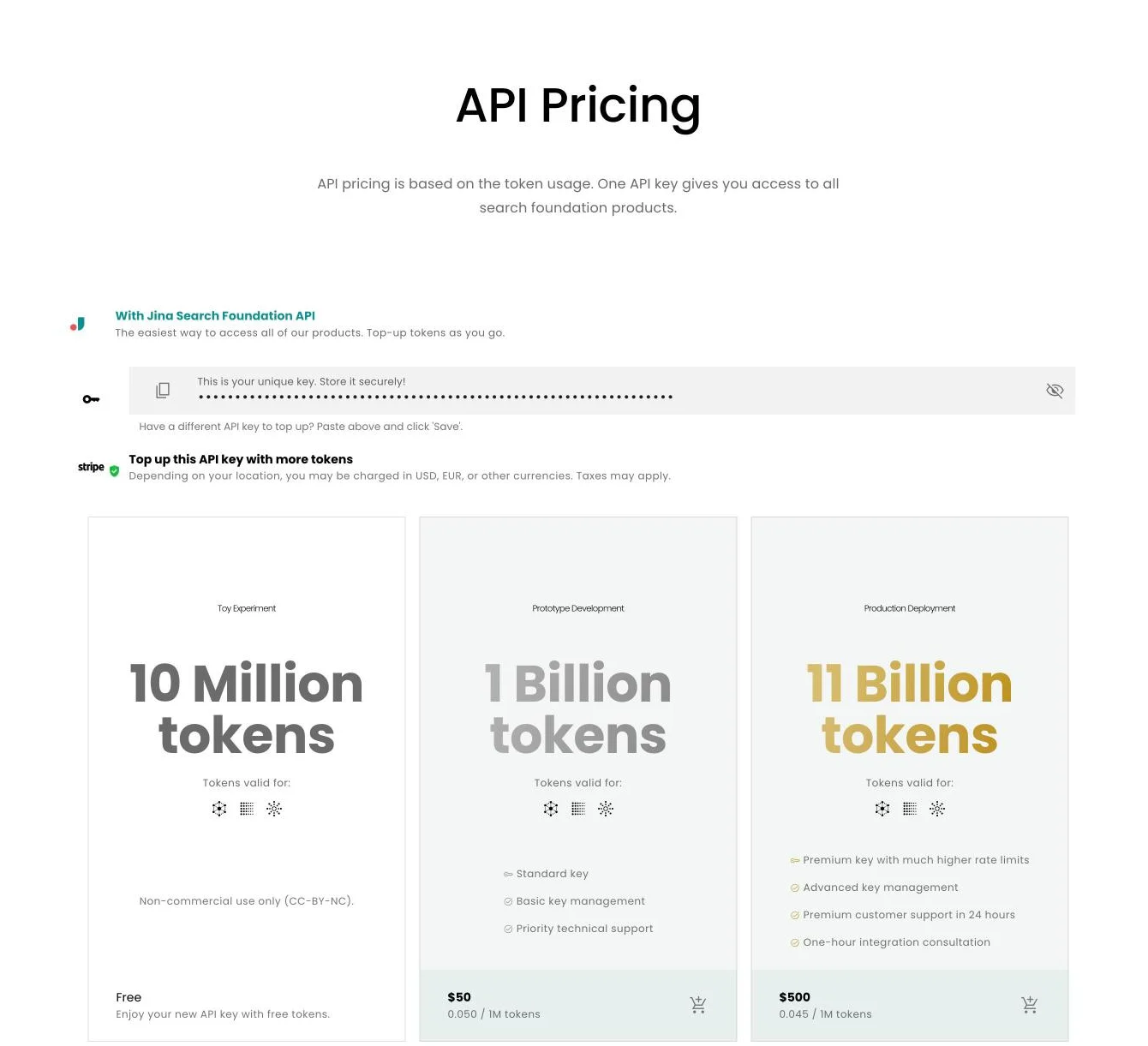
s.jina.aicosts a fixed number of tokens per request, starting from 10,000. - Free key: The Toy Experiment key includes 10 million tokens for non-commercial use.
- Paid keys: Prototype is 1 billion tokens for $50, and Production is 11 billion tokens for $500 with a premium key, advanced key management, 24-hour premium support, and a one-hour integration consultation.
See Jina Reader pricing.
8. ScrapeGraphAI: Best for natural-language extraction into structured JSON
ScrapeGraphAI is an “AI-powered web scraping API” that extracts structured data from a website with a natural-language prompt.
It scrapes to Markdown, HTML, links, images, a summary, JSON, branding, or a screenshot, extracts JSON by prompt or schema, searches, crawls with start, stop, and resume, and monitors pages on a schedule with webhooks.
Its pages list generic Scrape, Extract, Search, and Crawl endpoints rather than per-site ones, so it isn’t built for teams that want a maintained endpoint for each retailer or search engine.
ScrapeGraphAI top features:
- Extraction by natural-language prompt or reusable schema.
- Render modes
auto,fast, andjs, plus a stealth toggle for anti-bot at 5 extra credits. - AI search that returns results with page content.
- Crawls with start, stop, and resume controls.
- Monitor jobs that run on a cron schedule and call a webhook on change.
- An MCP server, a Skill, a CLI, and Python and JavaScript SDKs.
- A library under the MIT licence next to the paid hosted API.
ScrapeGraphAI pros and cons:
| Pros | Cons |
|---|---|
| Prompt-to-JSON extraction needs no selectors. | Reddit users say cost bites at larger workloads, and one G2 reviewer says prompt wording took support and several attempts. |
| Integrates with LangChain, LlamaIndex, CrewAI, LangGraph, Agno, LiteLLM, Vercel AI SDK, n8n, Make, and Zapier, with guides for OpenAI, Anthropic, and Gemini. | Reddit users said debugging was blind on its earlier API version because the infrastructure layer is hidden. |
| States SOC 2 Type II compliance on its pricing page. |
ScrapeGraphAI pricing
- Billing unit: API credits, where scrape is 1 credit for Markdown, extract is 5, and search is 2 or 5 per result.
- Crawl: 2 credits plus the format and stealth cost per page.
- Free plan: 500 credits one time at 10 requests a minute.
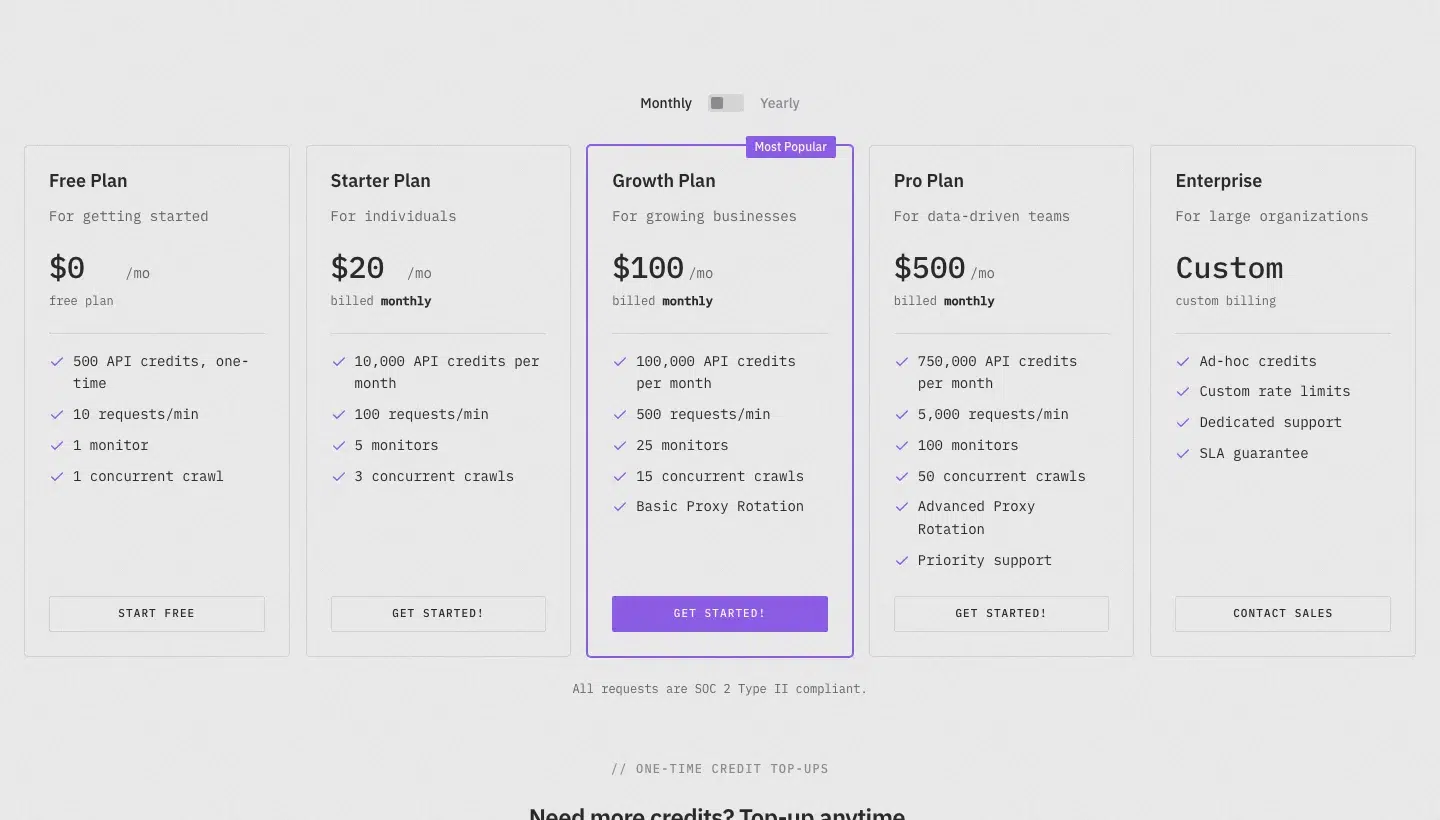
- Paid plans: Starter is $20 a month for 10,000 credits, Growth is $100 for 100,000, and Pro is $500 for 750,000.
- Top-up packs: $5 for 1,000 credits, $40 for 10,000, and $150 for 50,000.
9. Tavily: Best for search plus extraction in agent workflows
Tavily is “the web access layer for AI agents” that returns RAG-ready search results and extracted content, and the company has joined Nebius, with its site now reading “Tavily by Nebius”.
It offers Search, Extract, Crawl, Map, and Research endpoints, and the extractor returns Markdown or text.
Its Extract docs recommend extract_depth=advanced for JavaScript-rendered pages, but they list no browser actions, scheduling, proxy controls, or anti-bot handling, so it isn’t the choice for protected targets.
Tavily top features:
- Search at 1 credit for basic, fast, and ultra-fast depth and 2 for advanced.
- Extract to Markdown or text, up to 20 URLs per request.
- Crawl and Map endpoints for sites.
- Cited research reports through the Research endpoint.
- A keyless trial of Search and Extract.
- An MCP server, a CLI, and Python and JavaScript SDKs.
- Search rate limits of 100 requests a minute on the free plan, 1,000 on Pay As You Go, Project, Bootstrap, and Startup, and 1,500 on Growth, with Crawl and Map capped at 100 and Research at 20.
Tavily pros and cons:
| Pros | Cons |
|---|---|
| Search and fetch are separate primitives, the pattern r/AI_Agents users describe for cutting scraping cost. | One r/LocalLLM user found it “way too expensive at scale”. |
| A failed extraction isn’t charged. | A G2 reviewer calls it a bit expensive. |
| Free tier of 1,000 credits a month with no card. |
Tavily pricing
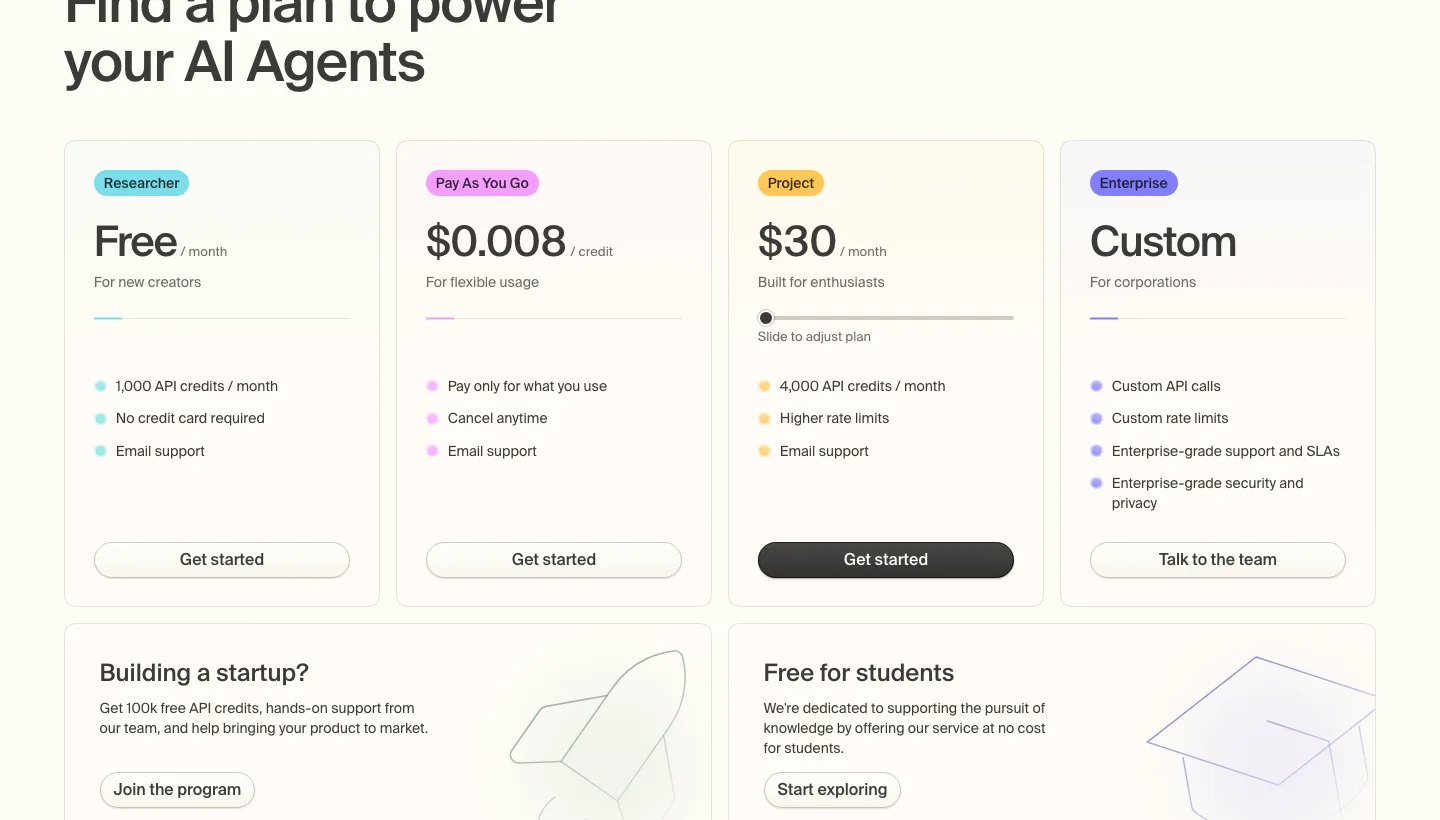
- Billing unit: API credits, where Extract costs 1 credit for every five successful URLs in basic mode, and Map costs 1 credit for every 10 successful pages. Failed extractions aren’t charged.
- Free plan: The Researcher plan is free with 1,000 credits a month.
- Pay-as-you-go: $0.008 per credit.
- Monthly plans: Project is $30 a month for 4,000 credits, Bootstrap is $100 for 15,000, Startup is $220 for 38,000, and Growth is $500 for 100,000.
See Tavily pricing and the credit tiers.
When should you choose which Firecrawl alternative?
Pick the tool that matches the job Firecrawl struggles with.
| Your situation | Best fit | Why |
|---|---|---|
| Protected sites with HTML or JSON back at scale | ScraperAPI | The page comes back as HTML, Markdown, text, or typed JSON from protected sites, and Async and DataPipeline run it at volume. |
| You want cost to follow site difficulty | Zyte | Five site tiers, so cost follows the target. |
| Single pages with JavaScript scenarios | ScrapingBee | Credits per request and concurrency up to 400 on Business+. |
| Ready-made scrapers and multi-page crawls | Apify | Actors for specific sites and a content crawler. |
| Self-hosting with no per-request fees | Crawl4AI | You run the server and bring the proxies. |
| Quick Markdown from one URL | Jina Reader | Free basic use, with no bot bypass. |
| Prompt-to-JSON extraction | ScrapeGraphAI | No selectors to write, credit cost by format. |
| Search plus extraction for an agent | Tavily | Search and extract on one key. |
| Public pages at a low credit price | ScrapingBee | 1 credit per plain request, 5 with JavaScript rendering. |
At volume, check rate limits, how many credits a plan includes, and whether pay-as-you-go applies, because those decide whether a plan holds through a busy month.
For live data in an agent, our guide to live web data for AI agents compares MCP, CLI, and skills.
Firecrawl alternatives FAQs
What are the best alternatives to Firecrawl?
The best alternative depends on the job. Among Firecrawl competitors, ScraperAPI, Bright Data, and Zyte handle protected sites; Crawl4AI is the self-hosted option, Apify has ready-made Actors, and Tavily and Jina Reader cover search and quick markdown. ScraperAPI’s comparisons cover more pairings.
Is there an open-source Firecrawl alternative?
Yes. Crawl4AI is an open-source crawler licensed under Apache 2.0, and ScrapeGraphAI’s library is MIT. Firecrawl itself is AGPL-3.0, so self-hosting it carries that licence’s obligations.
Are there free Firecrawl alternatives?
Yes. ScraperAPI gives a 7-day trial with 5,000 credits, then 1,000 credits a month. Bright Data gives 5,000 requests a month shared across its products, and Tavily and Crawl4AI Cloud give 1,000 credits a month. Jina Reader is free for basic use, and Crawl4AI’s library is free on your own server.
Is Firecrawl free?
Firecrawl has a free plan with 1,000 credits a month and no card required, covering about 1,000 pages. The free plan is rate-limited to 10 requests a minute on scrape, map, and search.
What is the cheapest alternative to Firecrawl?
It depends on the target. At the 100,000-credit size, ScraperAPI Hobby costs $49 and Firecrawl Standard costs $99, but ScraperAPI’s JavaScript rendering uses 10 credits per page against 1 on Firecrawl. Crawl4AI has no per-request fee on your own server, and you pay for hosting and proxies.
Firecrawl vs Apify: Which is better?
Firecrawl charges credits per page and returns Markdown or JSON from a URL. Apify charges for compute units and sells ready-made Actors for specific sites, so it fits when a maintained scraper already exists for your target.
Firecrawl vs Crawl4AI: Which should you use?
Firecrawl is a hosted API with an open-source core, and Crawl4AI is a crawler you run yourself or use through its Cloud. Pick Crawl4AI when you want no per-request fees and can supply proxies and server upkeep.
To run the same five-URL comparison on your own targets, start a free ScraperAPI trial with 5,000 credits and no card.