Deciding between Firecrawl and ScraperAPI comes down to your required data output and the cost structure per request.
Firecrawl is a web data API for AI agents. It has endpoints for Search, Scrape, Map, Crawl, Interact, Agent, Monitor, and Parse, returns markdown or schema-based JSON at one credit per page, ships an MCP server and a CLI, and publishes an open-source core.
ScraperAPI is web data infrastructure that runs the whole pipeline as one vendor. Its products cover each step:
- ScraperAPI’s Crawler: finds pages by following links from a start URL.
- ScraperAPI’s Scraping API: unblocks pages and returns HTML, markdown, JSON, or CSV.
- ScraperAPI’s Async Scraper: scales to large batches of URLs.
- ScraperAPI’s DataPipeline: schedules collection and sends results to a webhook.
- ScraperAPI’s Structured Data Endpoints: return parsed JSON for Amazon, Google, ChatGPT, Walmart, eBay, Redfin, and more.
ScraperAPI acquired Traject Data, whose Rainforest API for Amazon, SerpWow API for Google and Bing, BlueCart API for Walmart, Countdown API for eBay, and RedCircle API for Target add purpose-built depth on the hardest sources.
This guide compares them on features, anti-bot handling, AI agent tools, security, and pricing. We also ran live tests: the same five URLs went through both tools, and we recorded the credits each request used.
Key takeaways
- Firecrawl suits teams that want markdown or schema JSON from any URL for agents and RAG. The trade-off is that credits rise when JSON or other formats are switched on, and some sites, such as Reddit, are declined.
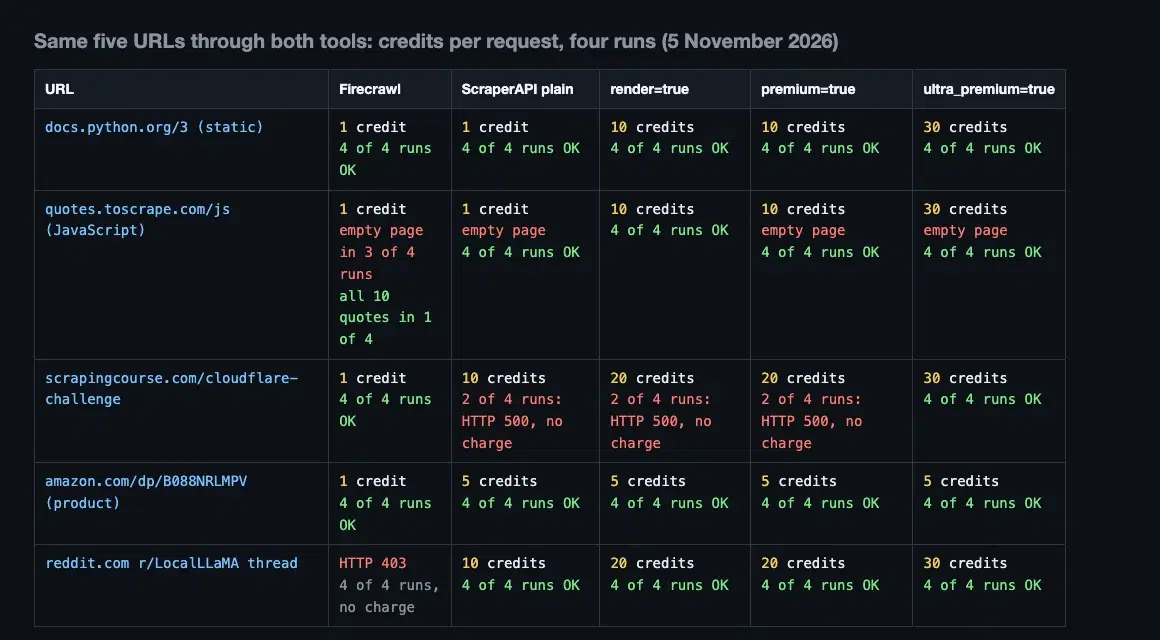
- Neither tool is cheaper on every page, so the answer depends on what you scrape. Across four test runs on 5 November 2026, Firecrawl charged 1 credit on the JavaScript page, the Cloudflare test page, and the Amazon product page as markdown, against ScraperAPI’s 10, 10, and 5. On the JavaScript page, Firecrawl returned an empty page in three of the four runs.
- ScraperAPI was cheaper on the static page and on typed Amazon JSON, returned all 10 quotes from the JavaScript page with
render=truein every run, and returned a Reddit thread in four of four runs that Firecrawl declined. - ScraperAPI’s credits cost about half as much at the same plan size ($0.49 against $0.99 per 1,000 credits), which is why 5 ScraperAPI credits for the full Amazon product object cost less than 5 Firecrawl credits for two fields.
Firecrawl vs ScraperAPI at a glance
| Criteria | Firecrawl (prices checked in November 2026) | ScraperAPI |
|---|---|---|
| Default output | Markdown | HTML (markdown, text, CSV, or JSON on request) |
| Entry paid plan | Hobby, $19 a month for 5,000 credits | Hobby, $49 a month for 100,000 credits |
| Price per 1,000 credits at 100,000 credits, monthly billing | $0.99 (Standard, $99) | $0.49 (Hobby, $49) |
| Free tier | 1,000 credits a month, plus a keyless tier | Free plan with 1,000 credits, plus a 7-day free trial with 5,000 credits |
| JavaScript pages | Rendered in Chromium on every scrape | render=true, 10 credits |
| Anti-bot handling | Enhanced proxy at the same credit cost | Four levels, from plain to ultra_premium, with published credit costs |
| Structured data | JSON by schema on any URL, +4 credits | Parsed JSON for Amazon, Google, Walmart, eBay, Home Depot, and Redfin |
| AI search results | Not listed | ChatGPT, Perplexity, Gemini, and Google AI Mode, 25 credits per prompt |
| Crawling | Crawl at 1 credit per page, and Map at 1 credit per call | Crawler with depth and credit-budget limits |
| Scheduling and batches | Batch scrape, Monitor | Async Scraper, DataPipeline, Crawler schedules |
| MCP server | Yes | Yes |
| Open source | AGPL-3.0 core, self-hostable | Hosted service |
Why you might need a Firecrawl alternative?
Most teams look for Firecrawl alternatives with a specific limit in mind, not because the product is broken.
- Credits multiply when you chain features: A basic scrape is one credit, but JSON extraction adds four credits per page, and Search adds two credits per 10 results plus the scrape cost of every result you scrape (Firecrawl billing).
A research step that searches, scrapes 10 results, and extracts JSON from each costs 2 + 10 × (1 + 4) = 52 credits by that arithmetic. At that rate, the 5,000 credits on Hobby cover about 96 such steps a month, where the same credits would cover 5,000 plain single-page scrapes.
The same table prices x.com at 30 credits per request and LinkedIn pages at 5 to 40 credits, because third-party providers answer them.
- Agent sessions can use credits faster than you expect: An agent decides how many searches and scrapes to make, so spend isn’t visible until the plan runs low.
A user running a local research agent said one session with 20 to 30 fetches and searches used most of their free credits, and a Firecrawl employee replied that they didn’t understand why light use would use that many credits and asked for the call log (r/hermesagent).
The practical point for a variable-cost agent is to check the per-call credits in the dashboard before you leave it running, because the free plan has no pay-as-you-go and returns HTTP 402 when credits run out.
- Some sites are declined on purpose: In our test, Firecrawl returned “we do not support this site” (HTTP 403) for a Reddit thread. In the Web Data Frontier Benchmark, a Firecrawl engineer wrote that the company blocks 10 of the benchmark sites, and Firecrawl passed 10 of 40 requests across eight social platforms (String’s comparison; String sells a competing product). If your pipeline needs social platforms, forums, or reviews, no Firecrawl plan fixes that, and you need a second tool for those sources.
- Cached copies can be up to two days old: Firecrawl serves a cached copy of a page by default when it is newer than two days (
maxAgeof 172,800,000 ms), and settingmaxAge: 0to force a fresh fetch makes the request slower and, in Firecrawl’s words, “more likely to fail” (Firecrawl docs).
For price tracking, stock levels, or news monitoring, a two-day-old page is a wrong answer delivered quickly, so you have to decide per job whether to accept stale data or a slower, less reliable request.
- The self-hosted build is not the Cloud product: The core is open source under AGPL-3.0, but Agent, Browser, managed dashboards, enhanced proxy paths, and enterprise controls are Cloud-only, and advanced anti-bot services need additional configuration (Firecrawl docs).
That makes self-hosting free in licence fees but not in effort, because you run the proxies, the browsers, and every upgrade. One r/LocalLLaMA user who had self-hosted for a year said an upgrade broke the MCP server and desktop-browser crawling, and that rolling back was “not easy and reliable”.
AGPL also asks anyone who runs a modified version as a network service to offer its source, so check with your legal team before building it into a product.
How we compared Firecrawl and ScraperAPI
We compared both tools on five criteria, then checked each against the vendor’s own pages and a live test.
| Criteria | Question it answers | Where we checked it |
|---|---|---|
| Features | What does one request return, and what else is included? | Firecrawl and ScraperAPI docs, live tests |
| Anti-bot performance | What does it cost to get a protected page? | Credit tables, live tests, two public benchmarks |
| AI agents and integrations | How do you connect it to an agent or workflow? | Docs for both tools |
| Open source, security, and support | Can you self-host, and what is promised? | Pricing and docs pages |
| Pricing | What does a page really cost? | Pricing pages, response headers |
Firecrawl vs ScraperAPI: Key features
Output formats
Firecrawl returns markdown by default and JSON, HTML, links, screenshots, or a summary on request. ScraperAPI returns HTML by default, and output_format switches any URL to markdown or text, while autoparse=true returns JSON or CSV for supported sites.
| Output | Firecrawl | ScraperAPI |
|---|---|---|
| Markdown | Default | output_format=markdown |
| Raw HTML | Yes | Default |
| Typed JSON from any URL | Schema or prompt, +4 credits | AI Parser |
| JSON from named sites | Not applicable | Structured Data Endpoints and autoparse |
| CSV | Not listed | output_format=csv with autoparse |
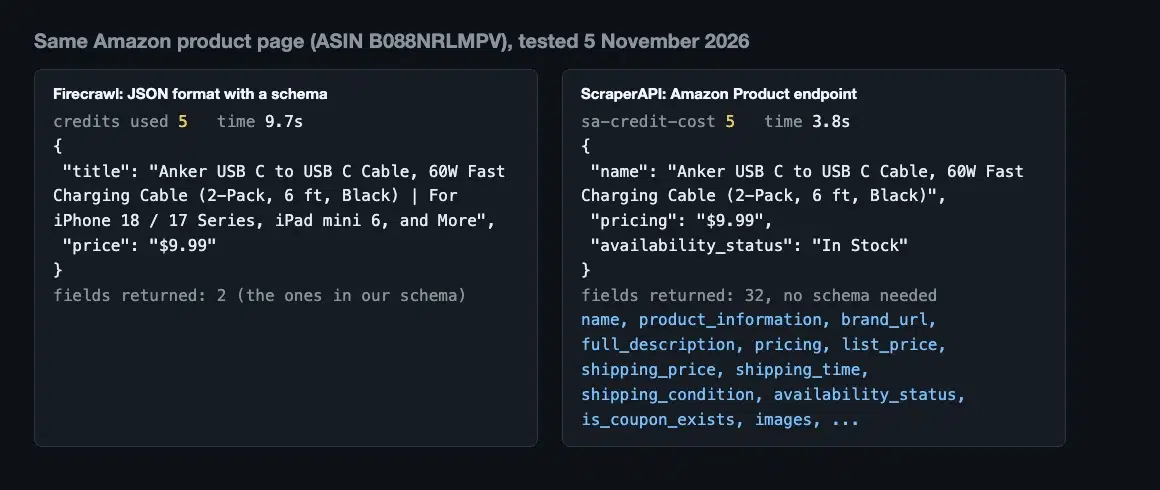
We tested markdown output on a static page and on a JavaScript page with ScraperAPI, and JSON on an Amazon product page with both tools. Firecrawl’s schema extraction returned the title and price we asked for, at five credits. ScraperAPI’s Amazon Product endpoint returned the full product object (32 fields, including name, pricing, availability, and images), also at five credits.
JavaScript rendering and browser actions
Firecrawl renders every page in Chromium and offers Interact and Agent for multi-step browsing. ScraperAPI renders on request with render=true, and its Rendering Instruction Set clicks, types, scrolls, and waits.
We tested ScraperAPI’s Rendering Instruction Set on Wikipedia by typing a search term, clicking search, and waiting for the results container. ScraperAPI returned the results page for 10 credits, the same as a plain render. ScraperAPI recommends three to four instructions per request, and screenshot=true turns on rendering and returns a PNG link in the sa-screenshot header. A ScraperAPI screenshot request cost 10 credits in our test, the price of a render.

Search, crawl, and map
Firecrawl’s Search costs two credits per 10 results, Crawl costs one credit per page, and Map costs one credit per call, however many URLs it returns (Firecrawl docs). ScraperAPI’s Google Search endpoint returns parsed results, and ScraperAPI’s Crawler follows links on its own.

ScraperAPI’s Crawler starts from a URL, skips duplicate pages, stops at a link-depth or ScraperAPI credit-budget limit, posts results to a webhook, and runs on a schedule from hourly to monthly on paid plans. The free plan is limited to depth one. We started a Crawler job through the API and cancelled it. ScraperAPI’s Google Search endpoint returned eight organic results and eight related searches for 25 credits.
Structured data for named sources
Firecrawl extracts JSON from any page you describe, while ScraperAPI ships ready-made endpoints for the sources people scrape most. The difference is who writes and maintains the parser.
ScraperAPI’s Structured Data Endpoints cover Amazon (Product, Search, Offers), Google (Search, News, Jobs, Shopping, Maps), Walmart (Product, Search, Category, Reviews), eBay (Product, Search), Home Depot (Product, Reviews, Search), and Redfin (Agent, For Sale, For Rent, Search).
We tested Amazon, Google Search, Google News, Walmart, eBay, and Redfin, and each returned JSON at 5 to 25 ScraperAPI credits per request. On 5 November, Google News returned HTTP 500 on the first attempt without a charge and succeeded on a retry.
For deeper Amazon, Google, Walmart, eBay, and Target data, the Traject Data products that ScraperAPI acquired (Rainforest, SerpWow, BlueCart, Countdown, and RedCircle) return fields such as Buy Box owners, sellers, and deals.

AI search results
ScraperAPI returns what ChatGPT, Perplexity, Gemini, and Google AI Mode answer for a prompt, with sources, as JSON. Firecrawl’s pricing page lists no endpoint that does this.
ScraperAPI’s AI Results endpoints cost 25 credits per prompt, or 75 with required sources on ChatGPT. We tested all four with the prompt “what is a web scraping api” on 5 November 2026, and each returned HTTP 200 for 25 credits on the first attempt: Perplexity with 10 sources, Google AI Mode with six, and ChatGPT and Gemini with none, which happens when the model answers without searching the web for that prompt.
Results vary by prompt and by day. In earlier tests on 26 October, Perplexity and Gemini each returned HTTP 500 on the first attempt and succeeded on a retry, and on 27 October Perplexity returned HTTP 500 twice for a different prompt, so build retries into any pipeline that depends on these endpoints.
They suit AI visibility tracking and answer monitoring.

Parsing any site with AI
ScraperAPI’s AI Parser turns a page layout into a reusable parser. You send up to three example URLs of the same page type, and it generates a parser that extracts the fields from similar pages on that site.
The first parser on an account is free, and each extra parser, added field or modified field costs 30,000 ScraperAPI credits, up to five parsers on paid plans. Parsing a URL costs only the standard ScraperAPI scraping credits. Firecrawl’s schema extraction needs no training step, but charges four extra credits on every page.
Geotargeting, sessions, and devices
ScraperAPI’s country_code parameter routes a request through a proxy in that country, and the countries available depend on the plan.
Hobby and Startup cover the US and Europe, and Business and above add individual countries. session_number keeps one proxy for 15 minutes, device_type switches between mobile and desktop user agents, and Amazon ZIP code targeting is supported. Firecrawl also supports location: its location object takes an ISO country code and preferred languages, defaults to the US, and uses an appropriate proxy where one is available (Firecrawl docs), so check that your target country is supported before you rely on it.
Scale, scheduling, and delivery
ScraperAPI’s Async Scraper keeps retrying a job for up to 24 hours, takes batches of up to 50,000 URLs, and delivers to a webhook. ScraperAPI’s DataPipeline schedules projects of up to 100,000 URLs, keywords, ASINs, or Walmart IDs.
We submitted a ScraperAPI Async job for a static page, and the first status poll returned the finished result for one ScraperAPI credit. ScraperAPI’s DataPipeline returns HTML, JSON, or CSV through a webhook or download and keeps results for 30 days. Firecrawl offers batch scraping, concurrency by plan (5 to 100 browsers), and Monitor for change tracking. Readers on Reddit asked for alerts when scheduled jobs return nothing, and ScraperAPI’s dashboard shows error logs and success rates by domain. See ScraperAPI’s Async Scraper and DataPipeline guides.

Firecrawl vs ScraperAPI: Anti-bot performance and success rates
Both tools unblock protected pages, but they price it differently. Firecrawl bills one credit and escalates its proxy automatically. ScraperAPI lets you choose the level and publishes what each one costs.
Firecrawl states that its enhanced proxy costs the same one credit as a basic request. ScraperAPI’s levels are plain (1 credit), render=true (10), premium=true (10), and ultra_premium=true (30). Domains protected by Cloudflare, DataDome, PerimeterX, or Akamai are unblocked automatically and cost 10 credits per scrape (credit table). Requests with ultra_premium=true can return a cached copy no older than 10 minutes, and cache_control=no-cache forces a live fetch. For a Cloudflare walkthrough, see how to bypass Cloudflare with ScraperAPI.

Two public benchmarks compare the tools, and they disagree on the size of the gap. Scrapeway measured average success of 81.2% for Firecrawl and 60.1% for ScraperAPI across 11 targets in October 2026. The Web Data Frontier Benchmark, run on 30 October 2026 on 100 protected sites, measured 81.2% for Firecrawl (sixth of 17) and 76.4% for ScraperAPI (ninth of 17). String built that benchmark and sells a competing product. In String’s September run, ScraperAPI scored 84.0% (third) and Firecrawl 80.2%, and String says ScraperAPI’s score rose from 64.2% in August after it corrected its own adapter.
A gap of 5 points in one benchmark and 21 in another, plus an order that flipped between runs, tells you the result depends on the targets and the setup, so we don’t quote a success rate here. Our own results are in the live tests below.
Firecrawl vs ScraperAPI: AI agents and integrations
Both tools connect to agents through an MCP server and a CLI. ScraperAPI adds a plugin, framework integrations, no-code nodes, and SDKs.
| Integration | Firecrawl | ScraperAPI |
|---|---|---|
| MCP server | Yes, with setup guides for Claude and Claude Code, ChatGPT and Codex, Cursor, Grok Build, Hermes Agent, OpenClaw, OpenCode, Amp, Windsurf, and Google Antigravity | Remote server at mcp.scraperapi.com or a local one on Python or Docker, for Claude Code, Claude Desktop, Cline, Cursor, and Windsurf |
| CLI | Yes (search, scrape, parse, crawl, map, interact, agent, and monitor commands) | sapi CLI (scrape, cost, jobs, structured, crawler, pipeline, account) |
| Agent plugin and skills | Skills for Codex, Claude Code, Cursor, and OpenCode, installed by the CLI | Plugin with MCP tools and agent skills on the Claude Plugin Hub and ClawHub |
| Agent frameworks | LangChain, LlamaIndex, CrewAI, CAMEL-AI, Praison AI, Neuron AI, Vercel AI SDK, and Mastra | LangChain and LlamaIndex |
| No-code and workflow automation | Zapier, Make, n8n, and Pipedream, plus the visual builders Dify, Langflow, and Flowise | n8n node with templates and a Zapier app (beta) |
| SDKs | Python, Node.js, Go, Java, Ruby, Rust, .NET, PHP, and Elixir | Python, Node.js, PHP, Ruby, and Java |
We used ScraperAPI’s MCP server while researching this guide to run Google searches, Amazon searches, and page scrapes from an agent. For a comparison of MCP, CLI, and skills, read MCP vs CLI vs skills. Firecrawl also lists app-builder and platform integrations (Replit, Lovable, Stripe Projects, and Vercel Marketplace) and Composio as a tool layer.
Firecrawl vs ScraperAPI: Open source, security, and support
Firecrawl is the one to pick if you need to self-host the core, and ScraperAPI is a hosted service.
| Area | Firecrawl | ScraperAPI |
|---|---|---|
| Licence and hosting | AGPL-3.0 core, self-hostable, with Cloud-only features | Hosted service |
| Compliance | SOC 2 Type 2, DPA on Standard and above | GDPR and CCPA compliant |
| Support | Community on Free, Basic on Hobby, Standard on Standard, Priority on Growth and Scale, and Dedicated on Enterprise; a shared Slack channel from Growth | Priority support from Professional, and a dedicated support team and Slack support on Enterprise |
Firecrawl states its AGPL-3.0 licence on its own comparison page. If you want a free self-hosted crawler without a vendor, Crawl4AI is the usual choice, but you run the proxies, browsers, and anti-bot layer yourself (String).
Firecrawl vs ScraperAPI: Pricing
Firecrawl pricing starts lower, at $19 a month, but ScraperAPI gives more credits per dollar at the same plan size. What a page costs depends on the feature, the target, and the plan, so compare the cost per 1,000 pages for your own URLs.
Firecrawl’s plans (prices checked in November 2026):
| Plan | Monthly price | Annual price per month | Credits per month | Concurrent browsers |
|---|---|---|---|---|
| Free | $0 | $0 | 1,000 | 2 |
| Hobby | $19 | $16 | 5,000 | 5 |
| Standard | $99 | $83 | 100,000 | 25 |
| Growth | $399 | $333 | 500,000 | 50 |
| Scale | $749 | $599 | 1,000,000 | 100 |
| Enterprise | Custom | Custom | Custom | Custom |

ScraperAPI’s plans:
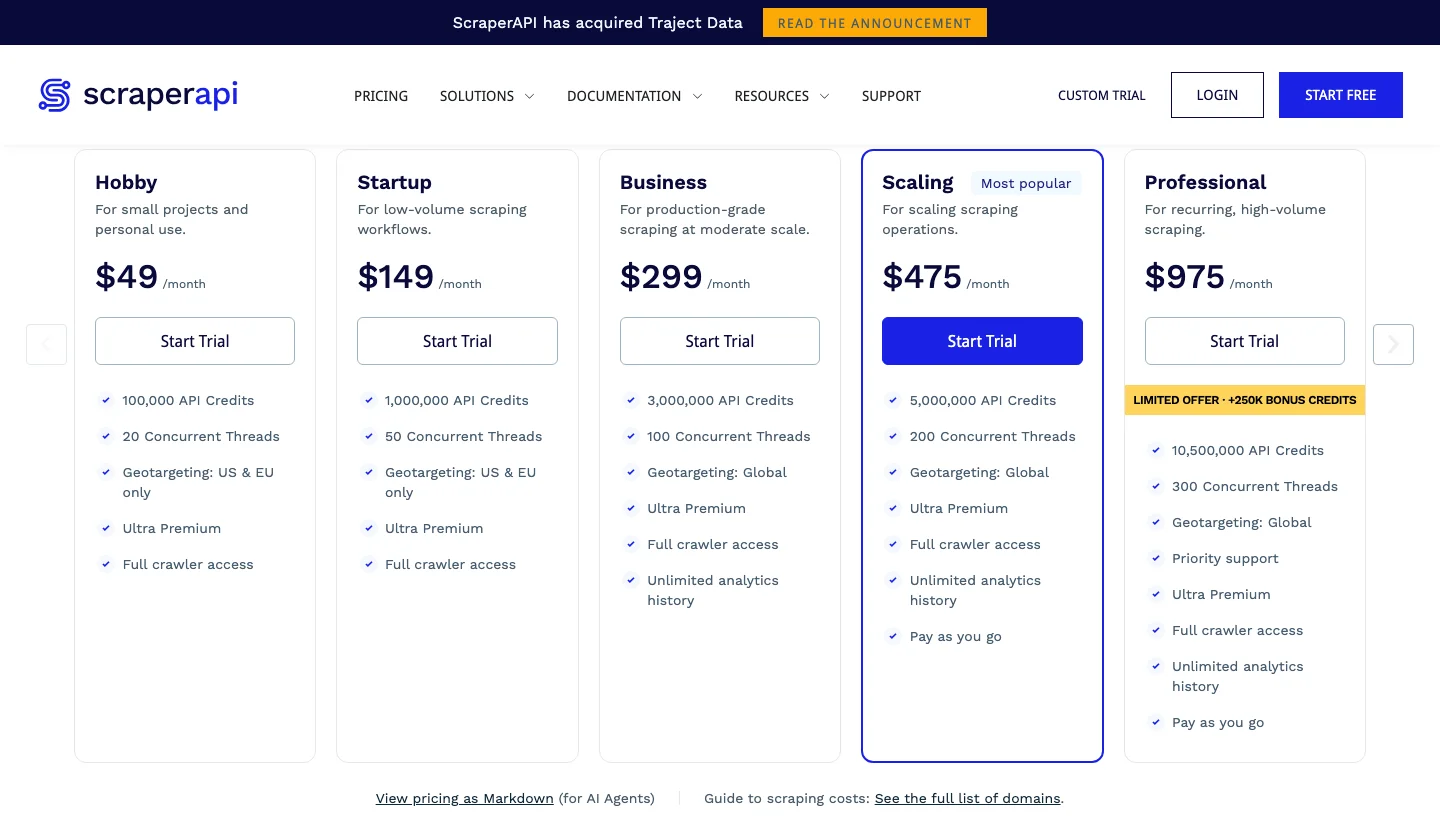
| Plan | Monthly price | Annual price per month | ScraperAPI credits per month | Concurrent threads |
|---|---|---|---|---|
| Free plan | $0 | $0 | 1,000 | 5 |
| Hobby | $49 | $44.10 | 100,000 | 20 |
| Startup | $149 | $134.10 | 1,000,000 | 50 |
| Business | $299 | $269.10 | 3,000,000 | 100 |
| Scaling | $475 | $427.50 | 5,000,000 | 200 |
| Professional | $975 | $877.50 | 10,500,000 | 300 |
| Advanced | $1,975 | $1,777.50 | 21,500,000 | 500 |
| Enterprise | Custom | Custom | 22,000,000 and above | 500 and above |
ScraperAPI’s 7-day trial includes 5,000 credits and needs no card. The billing rules differ in ways that change the bill:
| Rule | Firecrawl | ScraperAPI |
|---|---|---|
| Pay-as-you-go | Every paid plan, in $5 increments up to a monthly limit you set | Scaling plan ($475) and above, at a fixed per-credit rate up to a monthly cap |
| Credit rollover | Annual Scale only, for one month | None, credits reset at renewal |
| Failed or blocked pages | A page that returns 403 or 404 still costs 1 credit, a scrape that returns no result is not charged | A 404 costs credits because it is a real result: the site was reached and said the page does not exist. A 403 or 500 is not charged, because the request did not succeed. Requests cancelled before 70 seconds are charged |
| Spend controls | Spend limits per API key, crawl limit |
max_cost per request, cost estimator, auto-upgrade on Hobby to Professional |
Firecrawl’s rules come from its billing page.
For a full plan comparison, see ScraperAPI pricing.
How to avoid wasting credits
Check the cost before you scale, and cap it per request. ScraperAPI returns the cost of every request in the sa-credit-cost header, and its /account/urlcost endpoint returns the cost of a URL without scraping it. In our tests, it returned 5 for an Amazon product page and 30 for a LinkedIn company page.
max_cost caps a single request. We set max_cost=5 on a request that would have cost 10 ScraperAPI credits and got an HTTP 403 with no charge. ScraperAPI’s dashboard analytics page shows credits by domain, success rate, and error logs. Firecrawl’s per-key spend limits and monthly pay-as-you-go limit do the same job at the account level. Either way, price your own target list on both tools before choosing a plan.

Firecrawl vs ScraperAPI: Live test results on five URLs
We tested the same five URLs through both tools, four runs each on 5 November 2026, and read the credits and the returned page from each tool’s response. Firecrawl charged less on three of the five, but on the JavaScript page it returned an empty page in three of the four runs, and ScraperAPI returned the one page Firecrawl declined.