

An Amazon ASIN scraper does two jobs. It collects ASINs from search results, then it fetches the product data behind each one. This guide shows how to scrape Amazon ASINs in Python with ScraperAPI’s Amazon Search Scraper and Amazon Product Scraper, then shows how to run thousands of ASINs in batches and keep a list of the ones that fail.
What is an Amazon ASIN, and where do you find it?
An Amazon Standard Identification Number (ASIN) is a 10-character alphanumeric code that Amazon assigns to every product in its store, according to Amazon’s seller guide. Many ASINs start with B0. Books are the exception, because a book’s ASIN is typically its ISBN, so it starts with a number.
One product can carry several ASINs. The same item usually has a different ASIN on each marketplace, such as Amazon.com, Amazon.ca and Amazon.co.uk, and every variant of a product, such as a colour, has its own. We saw the variant case in our tests, and step three below uses it.
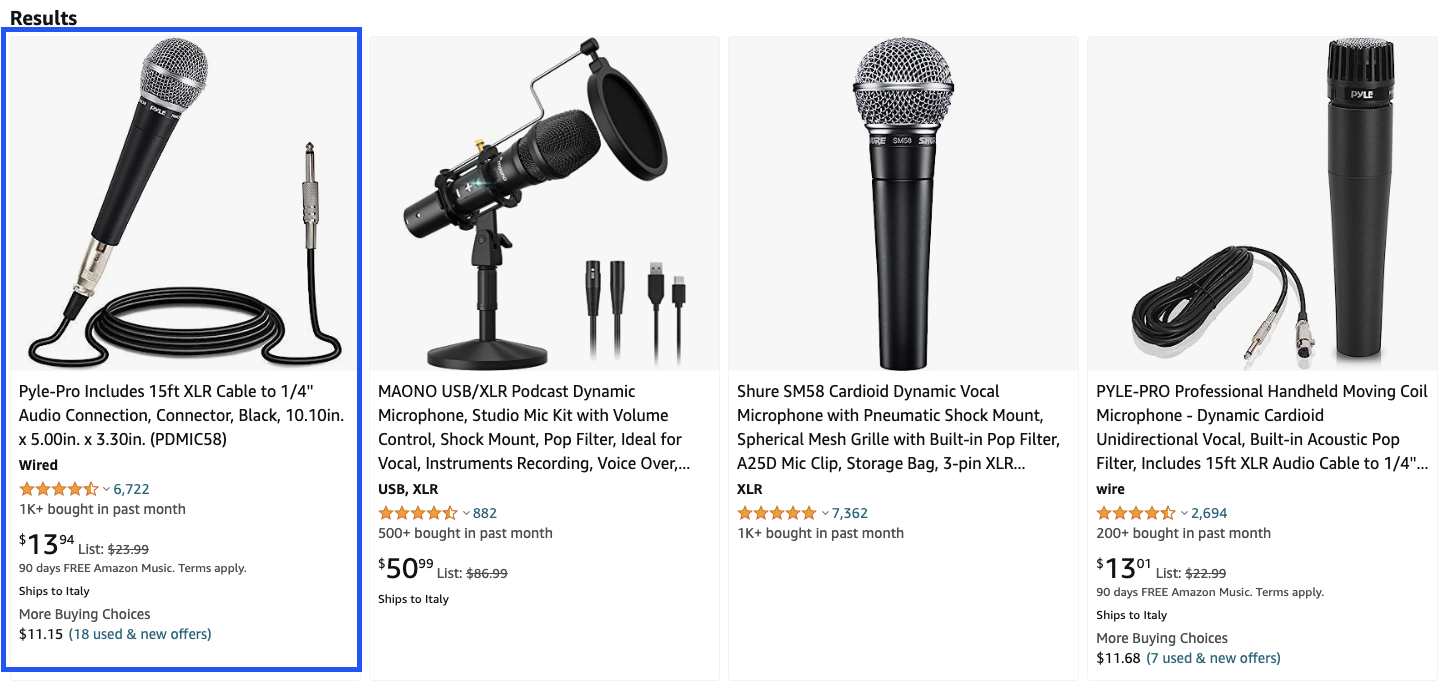
You can find a product’s ASIN in two places, the URL and the product page itself. As an example, search Amazon for “dynamic microphone” and open the first product.
Scroll down to the product information table. It lists the ASIN next to the item’s other details.
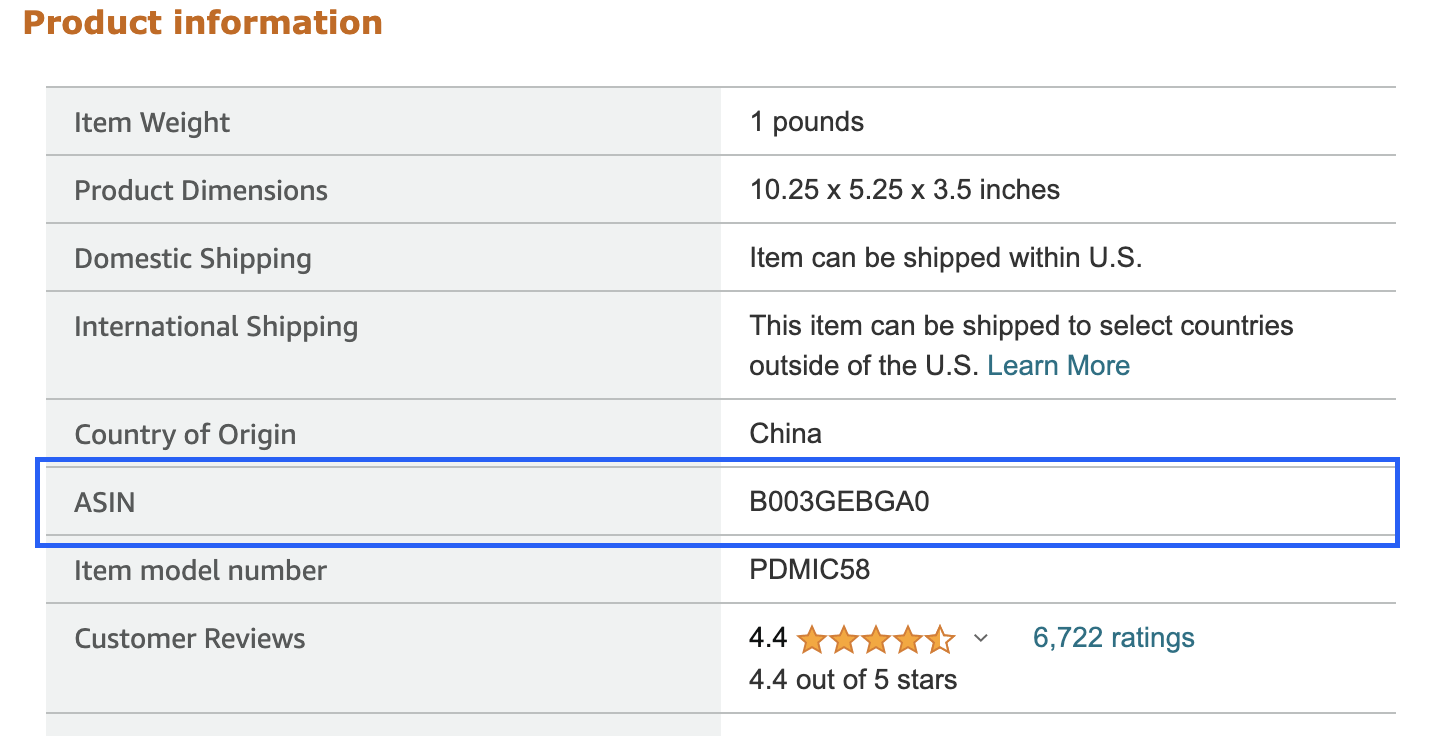
The same code sits in the product URL, right after /dp/. In the URL below, the ASIN is B003GEBGA0.
https://www.amazon.com/Professional-Unidirectional-Microphone-Connection-PDMIC58/dp/B003GEBGA0/ref=sr_1_1?keywords=dynamic+microphone
How to scrape Amazon ASINs with ScraperAPI?
To scrape Amazon ASINs with ScraperAPI, send a search query to the Amazon Search Scraper to collect ASINs, then send each ASIN to the Amazon Product Scraper to get the product as structured JSON. ScraperAPI handles proxy rotation, CAPTCHAs and retries on both calls, so your code only deals with the data. Both are Structured Data Endpoints, so together they work as an Amazon ASIN API for search and product pages.
Scraping ASINs yourself means building parsers, rotating IPs and retrying failures. ScraperAPI does the unblocking and returns clean data. Typical uses are price and availability tracking over a fixed list of ASINs, enriching your own catalogue with titles and images, and watching competitor listings for price or seller changes.
You can also fetch the Amazon search page as plain HTML and read the ASINs yourself. We tested both routes, and the cost is the same, five credits per request. What differs is what you maintain afterwards.
| Raw HTML with BeautifulSoup | Structured Data Endpoints | |
|---|---|---|
| What you write | A request, then a parser for data-asin and every other field you need | A request, then response.json() |
| What breaks | Your selectors, when Amazon changes the page layout | ScraperAPI maintains the parser |
| Search page test (“dynamic microphone xlr”) | 111 data-asin attributes, 101 with a value, 50 unique | About 50 results on page one (48 to 62 across our runs), each with a name, price, rating and review count, and an asin on most rows |
| Credits per request | 5 | 5 |
Layout changes are the usual reason these scrapers fail. A practitioner in an r/automation thread described detail-page scraping that “breaks every other week” because Amazon keeps testing new layouts. If you would rather compare approaches before you build, our guide to Amazon scraping tools covers the options.
Step 1: Collect ASINs from Amazon search
The Amazon Search Scraper takes a query and returns each result with its name, price, star rating and review count, plus its ASIN on most rows. Pass page to walk through the result pages, and collect the ASINs in a dictionary so duplicates drop out.
import requests

API_KEY = "YOUR_API_KEY"
asins = {}

for page in range(1, 4):
    response = requests.get(
        "https://api.scraperapi.com/structured/amazon/search",
        params={"api_key": API_KEY, "query": "dynamic microphone xlr", "tld": "com", "page": page},
    )
    for item in response.json()["results"]:
        if item.get("asin"):
            asins[item["asin"]] = item["name"]
    print("page", page, "->", len(asins), "unique ASINs so far")

print(list(asins)[:5])
We tested this with the query dynamic microphone xlr while writing this guide. Three pages cost 15 credits and returned 132 unique ASINs.
page 1 -> 50 unique ASINs so far
page 2 -> 93 unique ASINs so far
page 3 -> 132 unique ASINs so far
['B003GEBGA0', 'B000CZ0R42', 'B076WWQ4WT', 'B09MZNC8GS', 'B07MSCRCVK']
One of our earlier runs raised a KeyError because a result row had no asin, which is why the loop skips rows without one. The response also carries a separate ads list next to results, so check which list you read when you count products.
Step 1 alternative: Parse the ASINs from the search page HTML
If you want to read the ASINs from the raw HTML, the page structure is simple once you know where to look. Search Amazon for dynamic microphone xlr. The resulting URL is long, but the part you need is at the start, https://www.amazon.com/s?k=dynamic+microphone+xlr, and that is the URL you send through ScraperAPI.
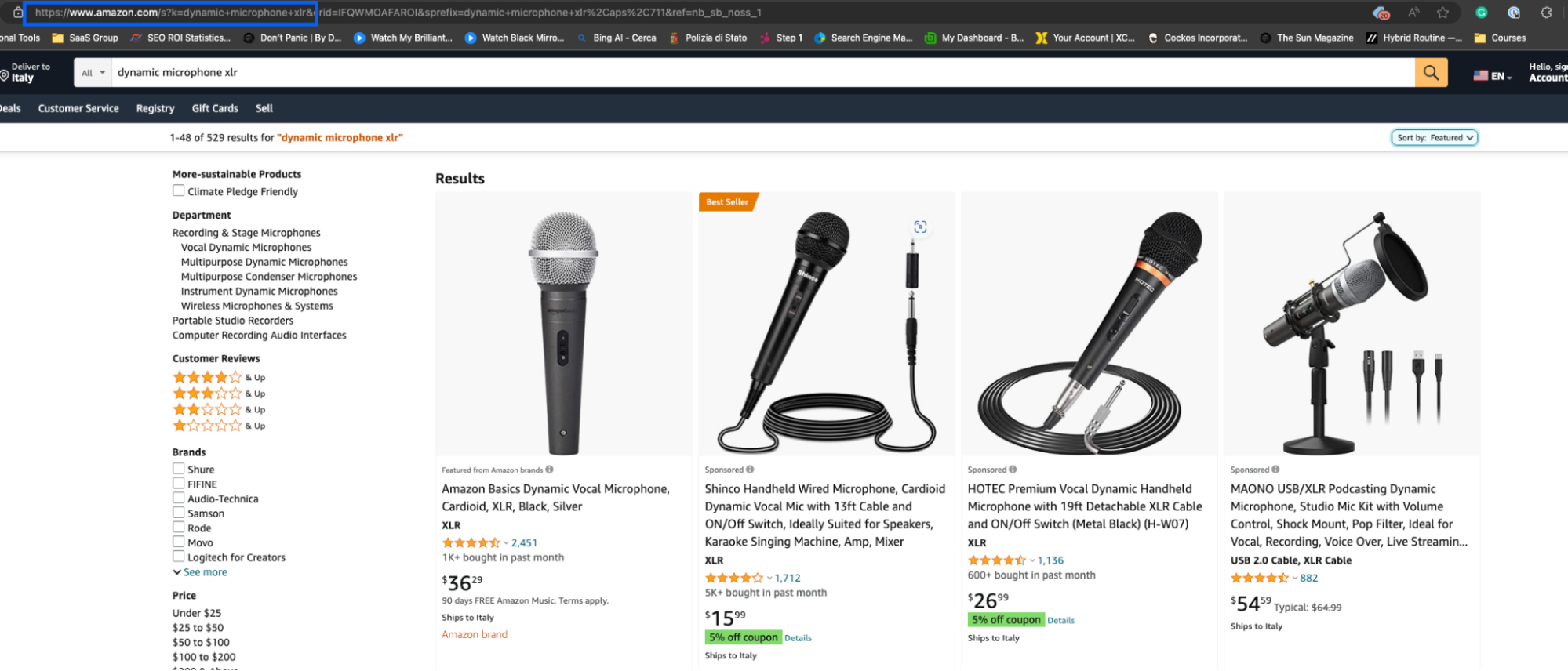
The page shows many products but no visible ASIN. Inspect it and you will see that each product card is wrapped in a <div>.
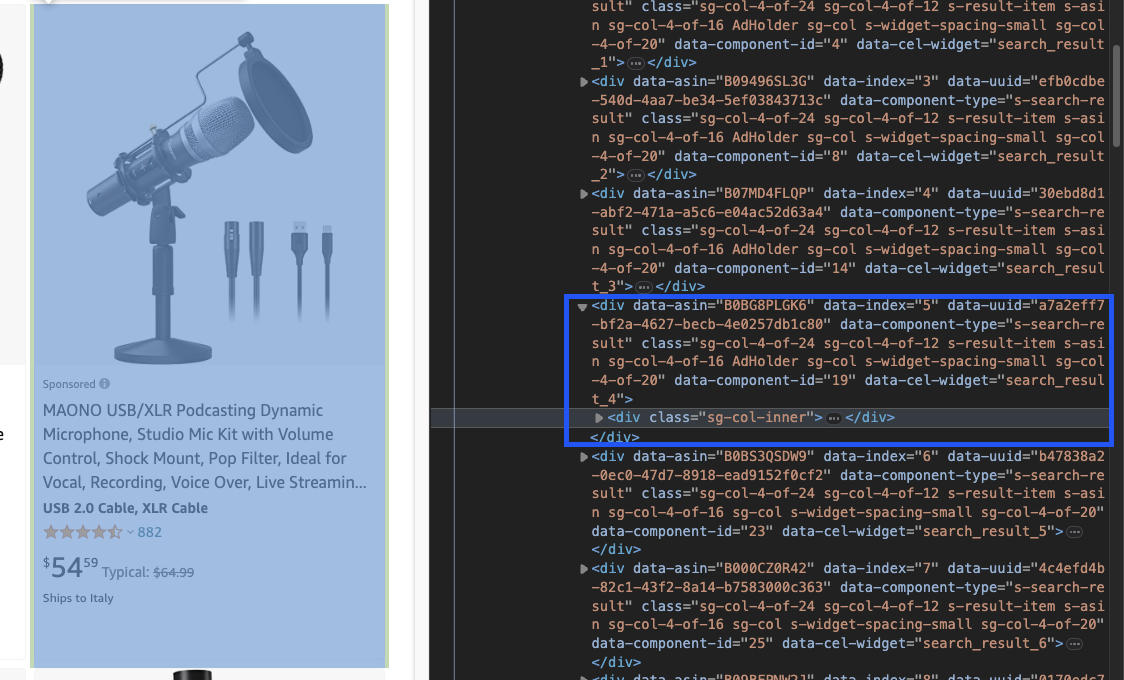
<div> element. Source: amazon.comEvery one of those <div> elements carries the product’s ASIN in a data-asin attribute, and that attribute is the target.
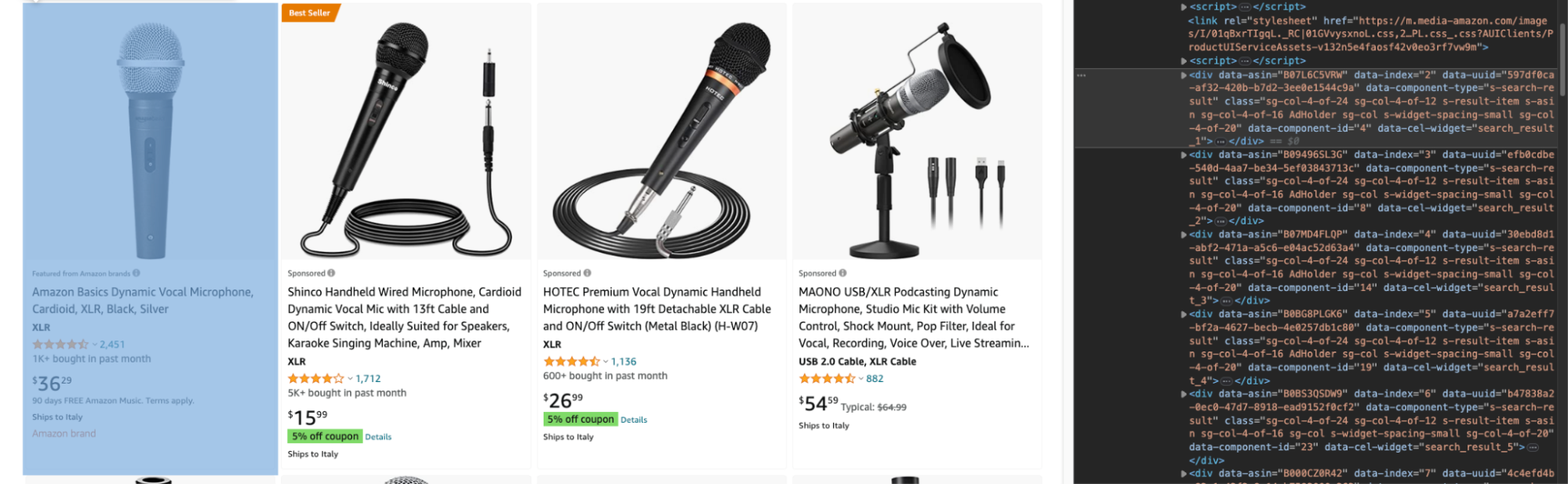
data-asin attribute holds the ASIN. Source: amazon.comWe tested the page with and without render=true, and both returned the same ASINs at the same cost, so the request below leaves rendering off.
import requests
from bs4 import BeautifulSoup

payload = {
    "api_key": "YOUR_API_KEY",
    "url": "https://www.amazon.com/s?k=dynamic+microphone+xlr",
}
response = requests.get("https://api.scraperapi.com", params=payload)
soup = BeautifulSoup(response.content, "html.parser")

asins = [div["data-asin"] for div in soup.select("div[data-asin]")]
print(len(asins), "data-asin attributes")
print(len([a for a in asins if a]), "with a value")
print(len(set(a for a in asins if a)), "unique ASINs")
111 data-asin attributes
101 with a value
50 unique ASINs
Some <div> elements carry the attribute with no value, and the same ASIN can appear more than once because of repeated and sponsored blocks, so filter empties and deduplicate. To collect more than one page, append page=2, page=3 and so on to the search URL in a loop. Doing that by hand across hundreds of pages is where IP blocks start, which is the job ScraperAPI takes over.
Step 2: Get product data for every ASIN
With a list of ASINs, the Amazon Product Scraper turns each one into structured JSON. First, start your free trial and copy your API key from the dashboard.
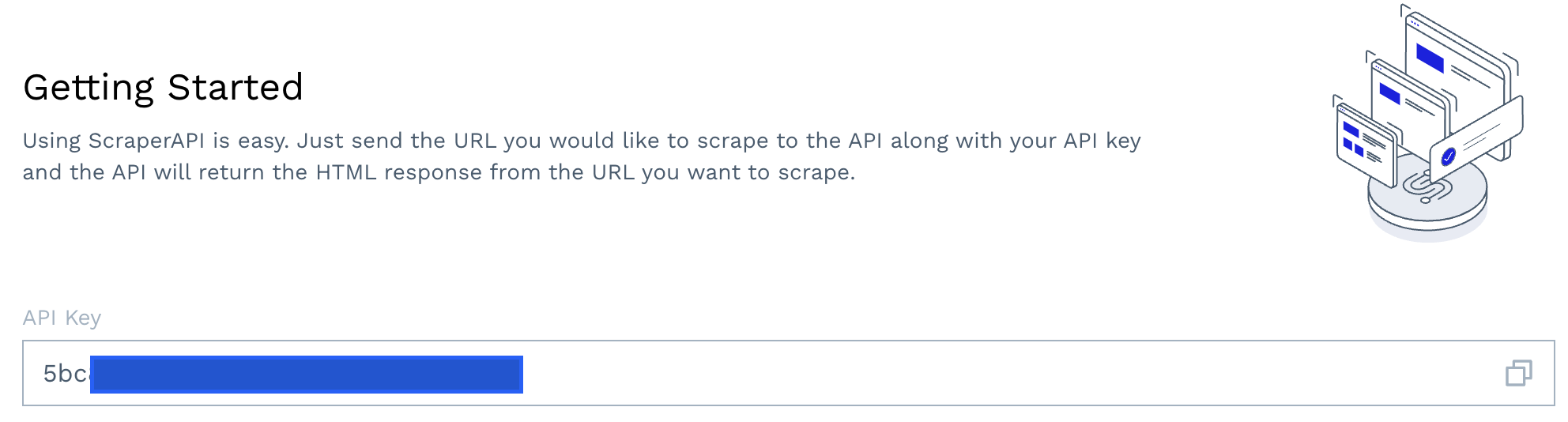
The payload takes the ASIN, the Amazon domain in tld, and an optional country_code that sets where ScraperAPI sends the request from. tld is the domain suffix, such as com, co.uk or de. Setting tld to us is a common mistake. We tested it on 6 October 2026, and the endpoint rejects it with HTTP 400 and the message “Target TLD is not valid”.
import requests

payload = {
    "api_key": "YOUR_API_KEY",
    "asin": "B003GEBGA0",
    "tld": "com",
    "country_code": "us",
}
response = requests.get("https://api.scraperapi.com/structured/amazon/product", params=payload)
print(response.text)
That single call turns the product page into JSON. We tested it on the microphone from the screenshots above. The response below is trimmed to the fields you will use most.
The fields below are the ones we used most. The response also includes full_description and the share of one- to five-star ratings.
| Field | What it holds |
|---|---|
pricing, list_price | The current price and the list price as strings |
availability_status | Stock status, such as “In Stock” |
average_rating, total_reviews | The star rating and the number of ratings |
feature_bullets | The bullet points from the product page |
product_information | The details table, including asin, upc, best_sellers_rank, item_weight and model_number |
customization_options | Variant options, each with its own ASIN |
images, high_res_images, sold_by | Image URLs and the seller name |
Numbers move between runs. This ASIN showed between 8,760 and 8,818 reviews across our runs, so re-run your own sample before you quote any figure. The reviews array is a sample, not a full review feed. It held 13 featured reviews in some of our runs and was empty in others, so if you need review text, use our guide to scrape Amazon reviews.
For a list of ASINs, loop over them and keep only the fields you need. A list of dictionaries loads straight into Pandas, which makes the CSV export a single line.
import requests
import pandas as pd

API_KEY = "YOUR_API_KEY"
rows = []

for asin in ["B003GEBGA0", "B09BZZCGC8", "B0CTJ7PVN1"]:
    response = requests.get(
        "https://api.scraperapi.com/structured/amazon/product",
        params={"api_key": API_KEY, "asin": asin, "tld": "com", "country_code": "us"},
    )
    product = response.json()
    rows.append({
        "asin": asin,
        "name": product["name"][:16],
        "price": product["pricing"],
        "rating": product["average_rating"],
        "reviews": product["total_reviews"],
        "upc": product["product_information"].get("upc"),
    })

df = pd.DataFrame(rows)
df.to_csv("asins.csv", index=False)
print(df.to_string(index=False))
      asin             name   price  rating  reviews          upc
B003GEBGA0 Pyle Microphone,  $22.99     4.4     8760 068888901796
B09BZZCGC8 Shure MV7X XLR D $199.00     4.6     3043 042406738071
B0CTJ7PVN1 Shure MV7+ USB-C $274.30     4.7     1115 042406791571
Each call costs five credits. To see seller prices for the same ASIN, send it to the Amazon Offers Scraper. In our test it returned eight offers for the microphone, each with a price, a condition, a delivery date and whether Amazon fulfils the order, plus the seller’s rating for third-party sellers, also for five credits. The Amazon scraping endpoints page lists every Amazon endpoint in one place.
Step 3: Follow variant ASINs
A product page shows one ASIN, but a product with colours or sizes has an ASIN for each option. The customization_options field in the product response lists them, so you can queue every sibling ASIN you have not seen yet.
import requests

API_KEY = "YOUR_API_KEY"
BASE = "https://api.scraperapi.com/structured/amazon/product"

def get_product(asin):
    r = requests.get(BASE, params={"api_key": API_KEY, "asin": asin, "tld": "com", "country_code": "us"})
    return r.json()

seen, queue = set(), ["B003GEBGA0"]
while queue:
    asin = queue.pop(0)
    if asin in seen:
        continue
    seen.add(asin)
    product = get_product(asin)
    for dimension, values in product.get("customization_options", {}).items():
        for option in values:
            if option["asin"] not in seen:
                queue.append(option["asin"])
    print(asin, product["pricing"], product["availability_status"])

print(len(seen), "ASINs found for one product")
B003GEBGA0 $22.99 In Stock
B0HKY876QX $24.99 In Stock
B0H6KCL5SX $29.57 In Stock
3 ASINs found for one product
One product produced three ASINs, each with its own price. The variant list can differ between requests. The same ASIN returned a fourth colour, B0DRW9BXNB, in some of our runs and three colours in others, so repeat the variant pass instead of trusting a single response.
Step 4: Run thousands of ASINs and track the failures
A loop of synchronous calls is fine for a few hundred ASINs. For ASIN scraping at larger scale, use the Async Scraper. You post a list of ASINs in one request with the asins parameter, and ScraperAPI returns one job per ASIN with a statusUrl to poll.
This matters most for the problem a user described on r/thewebscrapingclub. Their nightly job produced an incomplete dataset and “no clear list of failed ASINs”. The script below keeps that list by checking the status code of every job.
import time
import requests

API_KEY = "YOUR_API_KEY"
asins = ["B003GEBGA0", "B09BZZCGC8", "B0ZZZZZZZZ"]  # the last one does not exist

jobs = requests.post(
    "https://async.scraperapi.com/structured/amazon/product",
    json={"apiKey": API_KEY, "asins": asins, "tld": "com"},
).json()

done, failed = {}, {}
pending = {job["asin"]: job["statusUrl"] for job in jobs}

while pending:
    time.sleep(5)
    for asin, url in list(pending.items()):
        job = requests.get(url).json()
        if job["status"] == "running":
            continue
        pending.pop(asin)
        code = job["response"]["statusCode"]
        if code == 200:
            done[asin] = job["response"]["body"]
        else:
            failed[asin] = code

print("done:", list(done))
print("failed:", failed)
done: ['B003GEBGA0', 'B09BZZCGC8']
failed: {'B0ZZZZZZZZ': 404}
We tested this batch with two real ASINs and one that does not exist. The whole batch finished in under a minute. The invalid ASIN also came back with the job status finished, but its response.statusCode was 404. A check on the job status alone would have counted it as a success, so build your failure list from response.statusCode, as the script does. The ScraperAPI documentation says only responses with a 200 or 404 status are billed, so a bad ASIN still costs credits and is worth filtering out before you submit.
You can also pass a callback object with a webhook URL and skip the polling. We did not test the webhook for this guide, so check the documentation before you rely on it. Before you scale up, start with a tracked list of 20 to 50 ASINs, as the same r/automation thread suggests, and add more once the failure list stays short.
How do you do an ASIN lookup?
An ASIN lookup turns something you already have, such as a product URL or a barcode, into an ASIN, or turns an ASIN into product data. Three cases cover most needs.
From a URL to an ASIN
The ASIN sits after /dp/ in a product URL, so a regular expression extracts it without any request.
import re

url = "https://www.amazon.com/Professional-Unidirectional-Microphone-Connection-PDMIC58/dp/B003GEBGA0/ref=sr_1_1?keywords=dynamic+microphone"
match = re.search(r"/(?:dp|gp/product)/([A-Z0-9]{10})", url)
print(match.group(1) if match else None)
B003GEBGA0
From an ASIN to a UPC or GTIN
The Amazon Product Scraper returns the barcode data it finds on the page. For our microphone, product_information held "upc": "068888901796" and "global_trade_identification_number": "00068888901796". Not every product carries these fields, so read them with .get(), as the Pandas script above does.
From a barcode to an ASIN
To go the other way, use the Rainforest API from Traject Data, which ScraperAPI now owns. Per its documentation, you set type=product, pass the barcode in the gtin parameter and name the marketplace in amazon_domain, and the response returns the ASIN with the product data. Its gtin parameter accepts GTIN, UPC, EAN and ISBN values. We did not run Rainforest API calls for this guide, so those parameters come from its documentation.
For more on looking up ASINs by barcode with Rainforest API, check out this guide.
A reverse ASIN lookup is a different job. It lists the keywords a product ranks for on Amazon, and it is a seller research feature rather than a scraping task, so it is outside this guide.
What can go wrong when you collect Amazon ASINs?
Most failures in an Amazon ASIN scraper come from a short list of causes, and we hit several of them while testing. The table shows what we saw and the fix that worked. A thread on r/learnpython describes class names and tags that differ between product pages, so one set of selectors fails on the second listing.
| Problem | What we saw | Fix |
|---|---|---|
| Empty or repeated ASINs in the HTML | 111 data-asin attributes, 101 with a value, 50 unique | Drop empty values and collect the ASINs in a set |
| A search row without an ASIN | A KeyError on one run of the search loop | Read the field with item.get("asin") and skip the row |
| An ASIN that does not exist | A finished job with response.statusCode 404 | Build the failure list from the status code, not the job status |
| A rejected domain | HTTP 400 “Target TLD is not valid” for tld=us | Use a domain suffix such as com, co.uk or de |
| Review text missing | A reviews array with 13 entries in some runs and none in others | Treat it as a sample and use the reviews guide linked in step two |
| Numbers that change | Between 8,760 and 8,818 reviews for one ASIN across runs | Store a timestamp with every row |
| A variant list that changes | A fourth colour in some runs, three colours in others | Repeat the variant pass and merge the results |
How much does an Amazon ASIN scraper cost?
Each ASIN costs five credits through the Amazon Product Scraper, so a Hobby plan with 100,000 credits covers 20,000 ASINs a month. The search scraper returns many ASINs per request, so collecting them costs far less per ASIN than fetching their product data.
| Plan | Monthly price | API credits | ASINs per month at five credits |
|---|---|---|---|
| Hobby | $49 | 100,000 | 20,000 |
| Startup | $149 | 1,000,000 | 200,000 |
| Business | $299 | 3,000,000 | 600,000 |
| Scaling | $475 | 5,000,000 | 1,000,000 |
| Professional | $975 | 10,500,000 | 2,100,000 |
| Advanced | $1,975 | 21,500,000 | 4,300,000 |
Prices checked on 16 October 2026. Source: ScraperAPI pricing. Yearly billing is 10% cheaper.
The free trial lasts seven days and includes 5,000 credits with no credit card, which is enough for 1,000 ASINs, or all four steps above on a real list. If you need more than the Advanced plan, the ScraperAPI pricing page has a custom enterprise option.
Start your free trial and run an Amazon ASIN scraper on your own ASIN list with 5,000 free credits. If you collect Amazon data across many products and marketplaces, the Amazon scraping endpoints page shows how they fit together, and our guide to collecting Amazon product data covers the wider workflow.
Open the product page and read the 10 characters after /dp/ in the URL, or find the ASIN in the product information table. For a list of products, send each ASIN through the Amazon Product Scraper, which returns the ASIN together with the product data.
A SKU is a code the seller assigns to track their own inventory. An ASIN is a code Amazon assigns to each product, and it identifies that product across the store.
Yes. Amazon assigns an ASIN to every product listed in its store. For books the ASIN is typically the ISBN, so it starts with a number. The Amazon Product Scraper takes an ASIN as its input, so you need the ASIN of a product before you can fetch its details.
No, an ASIN identifies one product on one marketplace. The same product can have a different ASIN on another marketplace, and each variant of a product, such as a colour, has its own ASIN.
Yes, with a scraping API. Amazon blocks many automated requests, so ScraperAPI handles proxy rotation, CAPTCHAs and retries for you. In our tests, none of the search, product and offers requests returned a CAPTCHA.
It depends on what you collect and how. Amazon’s terms restrict automated access, and data behind a login is off limits, while public product pages are treated differently from private data. This is not legal advice, so read our guide on whether scraping Amazon is legal and speak to a lawyer before any large commercial project.
Open https://www.amazon.com/dp/ followed by the ASIN to reach the product page. If you only have a UPC, EAN or ISBN, the Rainforest API’s gtin parameter converts the barcode to an ASIN.
